
 Bizradar
 Tanva
How to Identify Your 10 Riskiest Cloud Assets
Summary
Cloud environments contain thousands of resources, but only a small number may represent the greatest security risks. Learn how to use cloud security posture management (CSPM), asset discovery, misconfiguration assessment, and attack path analysis to identify and prioritize your 10 riskiest cloud assets across AWS, Azure, and GCP.
Why Identifying High-Risk Cloud Assets Matters
Cloud environments change constantly. New virtual machines, databases, storage resources, applications, and user identities are created as businesses grow. Without continuous visibility, security teams can lose track of which resources are exposed and which ones require immediate attention.
A cloud asset inventory shows what exists in an environment. However, it does not automatically explain which resources could cause the greatest business impact if compromised.
For example, a publicly accessible storage bucket containing sensitive customer information may represent a greater risk than several low-severity configuration findings on isolated development resources.
This is where cloud security posture management (CSPM) becomes important. CSPM helps organizations discover cloud assets, identify misconfigurations, evaluate security risks, and prioritize remediation across cloud environments.
Instead of treating every security finding equally, CISOs should focus on questions such as:
- Which cloud assets are accessible from the internet?
- Which resources contain sensitive business or customer data?
- Which identities have excessive permissions?
- Which assets have critical vulnerabilities?
- Which resources are connected through potentially exploitable attack paths?
- Which assets support important business applications?
Identifying the 10 riskiest cloud assets gives security teams a practical way to focus remediation efforts on the resources that matter most.
What Makes a Cloud Asset High Risk?
An asset's risk depends on more than its vulnerability severity or configuration status. Security teams need to understand how exposure, permissions, data sensitivity, and business importance interact.
Consider a production database with sensitive customer information. If it is publicly accessible and connected to an overprivileged service account, the combined risk may be significantly higher than any individual finding suggests.
A cloud security posture assessment should consider six important factors.
These factors help organizations move beyond basic vulnerability lists and build a more contextual cloud risk assessment.
10 Cloud Assets That Deserve Priority in CSPM Assessments
The following asset categories are important starting points when identifying high-risk resources. Their actual priority depends on the organization's architecture, exposure, permissions, and business context.
1. Publicly Accessible Cloud Storage
Cloud storage frequently contains customer files, application backups, database exports, and internal business documents.
Incorrect access policies can expose this information to unauthorized users. Security teams should review public access settings and determine whether sensitive information is stored in exposed locations.
What to check:
- Public read and write permissions.
- Anonymous access configurations.
- Storage access policies.
- Sensitive files in publicly accessible locations.
- Encryption and access logging.
CSPM priority: Detect unintended public exposure and validate whether storage permissions follow organizational security policies.
2. Internet-Exposed Production Databases
Production databases often store customer information, application records, and business-critical data.
A database that accepts connections from unrestricted IP ranges or uses weak access controls can become a serious security concern.
What to check:
- Public database endpoints.
- Firewall and network security rules.
- Authentication requirements.
- Encryption at rest and in transit.
- Privileged database accounts.
- Backup access permissions.
CSPM priority: Identify exposed database resources and prioritize those containing sensitive information.
3. Overprivileged IAM Roles and Service Accounts
Cloud identities control access to applications, infrastructure, databases, and storage resources.
An identity with unnecessary administrative permissions can increase the impact of compromised credentials. Service accounts with broad permissions may also create unexpected access paths.
What to check:
- Administrator-level permissions.
- Wildcard IAM policies.
- Unused roles and accounts.
- Excessive service account privileges.
- Long-lived access credentials.
- Cross-account access relationships.
CSPM priority: Identify excessive permissions and reduce unnecessary access through least-privilege controls.
4. Internet-Facing Virtual Machines
Virtual machines running public-facing applications or management services can provide attackers with an entry point into cloud environments.
Unrestricted ports, outdated operating systems, and unpatched software can increase exposure.
What to check:
- Public IP addresses.
- Open SSH, RDP, and management ports.
- Operating system patch status.
- Installed software vulnerabilities.
- Administrative access restrictions.
- Security monitoring coverage.
CSPM priority: Prioritize internet-facing machines with critical vulnerabilities or excessive access.
5. Kubernetes Clusters and Container Workloads
Kubernetes clusters often support production applications and services that communicate with other cloud resources.
Misconfigured permissions, exposed API endpoints, vulnerable container images, and privileged workloads can create security risks.
What to check:
- Publicly accessible Kubernetes API endpoints.
- Cluster role permissions.
- Privileged containers.
- Vulnerable container images.
- Secrets stored in configuration files.
- Network policies between workloads.
CSPM priority: Identify insecure cluster configurations and workloads that could provide access to critical resources.
6. Cloud Secrets and Key Management Systems
Secrets and encryption keys protect access to applications, databases, storage, and cloud services.
Poorly managed credentials can allow unauthorized users or compromised applications to access sensitive resources.
What to check:
- Exposed API keys and application secrets.
- Excessive key permissions.
- Inactive or outdated credentials.
- Key rotation practices.
- Secrets management access policies.
- Key usage and administrative logs.
CSPM priority: Identify exposed credentials and excessive permissions that could increase the impact of a compromised identity.
7. Unpatched Production Workloads
Production workloads may contain outdated operating systems, vulnerable libraries, or unsupported software components.
A vulnerability becomes more concerning when it affects an internet-facing or business-critical resource.
What to check:
- Critical and high-severity vulnerabilities.
- Known exploited vulnerabilities.
- Internet accessibility.
- Available security patches.
- Workload ownership.
- Remediation status.
CSPM priority: Combine vulnerability information with asset exposure and business importance to prioritize remediation.
8. Backup and Disaster Recovery Resources
Backup systems are essential for business continuity, but they can also become attractive targets.
If backup storage is accessible using compromised production credentials, an incident may affect both primary systems and recovery options.
What to check:
- Backup storage permissions.
- Isolation from production environments.
- Encryption settings.
- Retention policies.
- Administrative access.
- Recovery testing records.
CSPM priority: Identify weak backup access controls and resources that are not sufficiently isolated.
9. Cloud Networks and Security Gateways
Virtual networks, firewalls, load balancers, and gateways determine how cloud resources communicate.
Incorrect network rules can expose internal services or create unexpected access paths between environments.
What to check:
- Unrestricted inbound and outbound rules.
- Public management interfaces.
- Network segmentation.
- Access between production and development environments.
- Firewall policy exceptions.
- Connectivity to sensitive resources.
CSPM priority: Identify unnecessary exposure and network paths that could provide access to critical systems.
10. Critical Applications and API Endpoints
Cloud-hosted applications and APIs frequently connect to databases, identity providers, payment systems, and internal services.
An exposed API with weak authentication or excessive permissions can create risks beyond the application itself.
What to check:
- Public API endpoints.
- Authentication and authorization controls.
- API keys and secrets.
- Sensitive data returned by endpoints.
- Application dependencies.
- Access to connected cloud services.
CSPM priority: Identify applications with weak access controls and connections to sensitive cloud resources.
How to Identify Your 10 Riskiest Cloud Assets
Identifying asset categories is only the beginning. Security teams need a repeatable process to discover individual resources, evaluate their risk, and select the highest-priority assets.
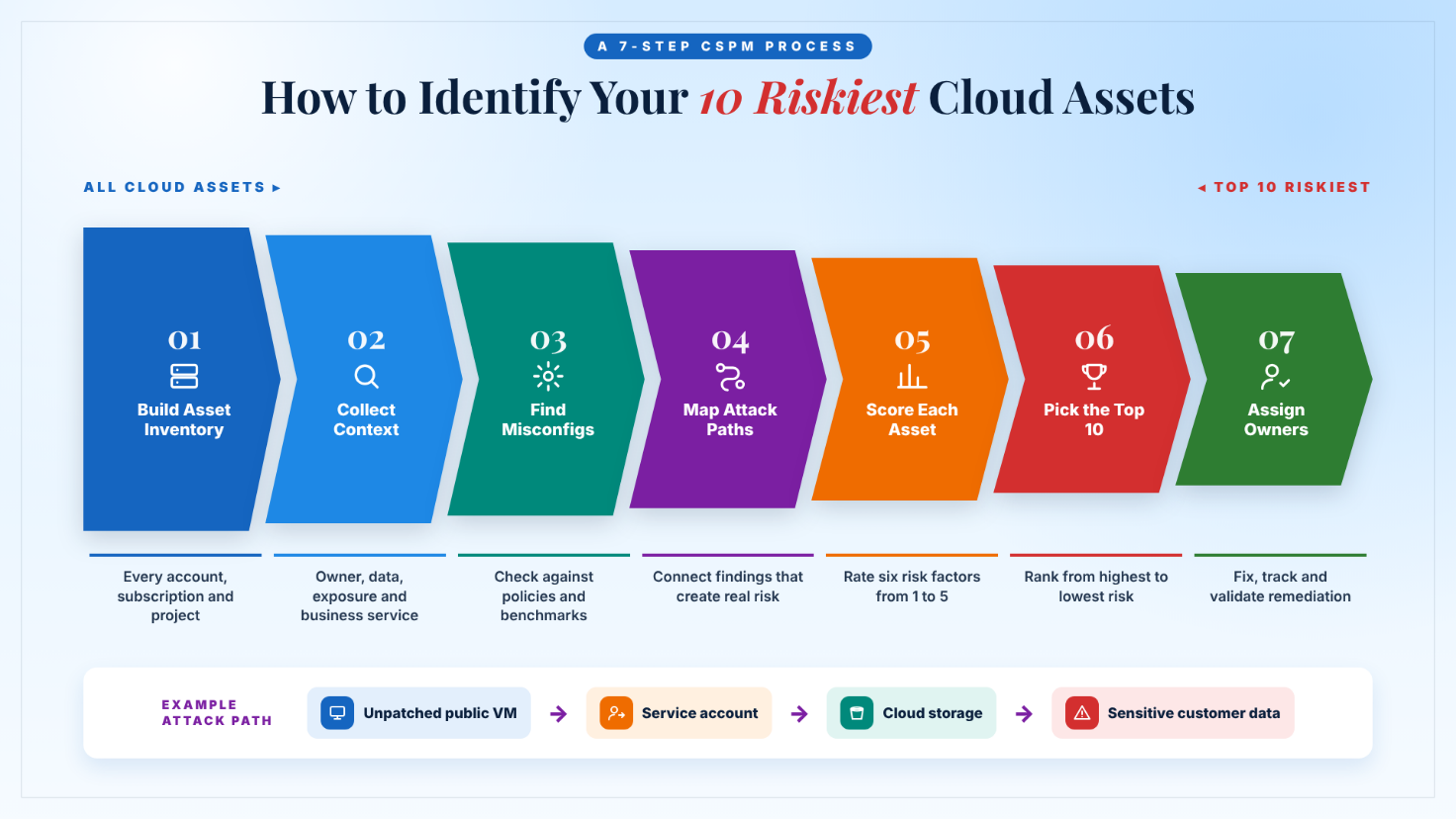
Step 1: Build a Complete Cloud Asset Inventory
Start by discovering resources across every cloud account, subscription, and project.
Your cloud asset inventory should include:
- Virtual machines and compute instances.
- Storage buckets and file storage.
- Databases and data warehouses.
- Kubernetes clusters and containers.
- IAM users, roles, and service accounts.
- Networks, gateways, and firewalls.
- Secrets stores and encryption keys.
- Applications and APIs.
- Backup and recovery resources.
Record each asset's owner, environment, purpose, cloud provider, and business service.
CSPM tools can help automate cloud asset discovery and maintain visibility as resources change.
Step 2: Collect Security and Business Context
An inventory tells you what exists. Additional context helps determine which resources deserve priority.
For each asset, collect information about:
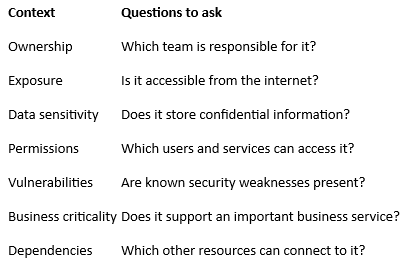
This information helps security teams distinguish routine configuration issues from risks that could affect important business operations.
Step 3: Perform a Cloud Misconfiguration Assessment
Review the configurations of discovered assets against internal security policies and recognized cloud security benchmarks.
Look for issues such as:
- Publicly accessible storage.
- Unrestricted network access.
- Unencrypted data stores.
- Excessive IAM permissions.
- Insecure database configurations.
- Missing logging and monitoring.
- Weak backup access controls.
A cloud misconfiguration assessment helps identify resources that do not meet the organization's security requirements.
However, not every misconfiguration has the same business impact. The next step is to evaluate how these findings connect.
Step 4: Use Cloud Attack Path Analysis
Individual findings may appear less serious when reviewed separately. Their combined effect can create a more significant security risk.
Consider this example:
- An internet-facing virtual machine contains an unpatched vulnerability.
- The machine can access an application service account.
- The service account has permissions to access cloud storage.
- The storage resource contains sensitive customer information.
Together, these weaknesses may create a path toward sensitive data exposure.
Cloud attack path analysis helps security teams understand these relationships and prioritize risks based on potential impact.
Step 5: Assign Risk Scores to Cloud Assets
Organizations can use a simple scoring model to compare individual assets.
For example, assign each risk factor a score from 1 to 5.
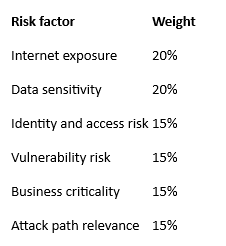
Illustrative formula:
Risk Score = (Exposure × 20%) + (Data Sensitivity × 20%) + (Access Risk × 15%) + (Vulnerability Risk × 15%) + (Business Criticality × 15%) + (Attack Path Relevance × 15%)
Each factor is scored from 1 to 5. The result is a comparative score between 1 and 5.
This is an example internal prioritization model, not an official industry risk standard. Organizations should adjust the weights to reflect their own risk appetite and business requirements.
Step 6: Select and Prioritize the Top 10 Assets
Once the scoring process is complete, rank assets from highest to lowest risk.
The following example shows how a security team might organize its findings.
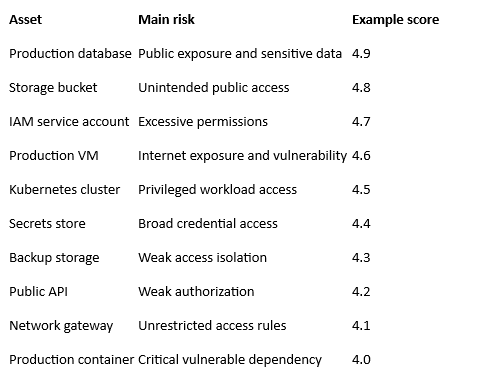
These scores are hypothetical and demonstrate how to organize a prioritization exercise. They are not measurements of any real cloud environment.
Step 7: Assign Owners and Track Remediation
Identifying high-risk assets only creates value when the organization takes action.
For each asset, define:
- The identified security issue.
- The business impact.
- The responsible team.
- The remediation priority.
- The target resolution date.
- The validation method.
Track remediation progress and verify that the identified issue has actually been resolved.
Identifying High-Risk Assets Across AWS, Azure, and GCP
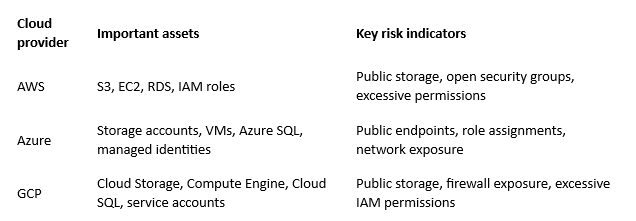
Multi-cloud environments introduce additional complexity because each provider uses different services, configurations, and permission models.
CISOs should establish common risk categories while reviewing provider-specific resources.
AWS Security Posture Management
For AWS, review S3 bucket access, EC2 exposure, IAM permissions, security group rules, and RDS database accessibility.
Pay particular attention to production resources and identities with broad permissions.
Azure Security Posture Management
For Azure, review storage account access, virtual machine exposure, Azure SQL configurations, network security groups, and role assignments.
Check whether permissions inherited through subscriptions and management groups are appropriate.
GCP Security Posture Management
For GCP, review Cloud Storage permissions, Compute Engine firewall rules, Cloud SQL exposure, and service account privileges.
Project-level permissions and cross-service access should also be evaluated.
Establish a Unified Multi-Cloud Risk View
Use consistent categories across all providers:
- Asset criticality.
- Internet exposure.
- Data sensitivity.
- Identity permissions.
- Vulnerability status.
- Attack path relevance.
- Remediation ownership.
This makes multi-cloud security assessment more consistent and helps leadership understand where the most significant risks exist.
How CSPM Services Help Prioritize Cloud Assets
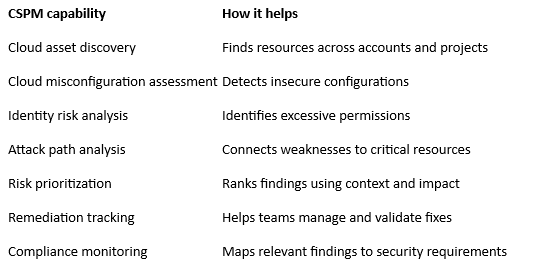
Cloud Security Posture Management helps organizations continuously discover cloud resources, evaluate configurations, identify security weaknesses, and prioritize remediation.
Modern CSPM capabilities can combine asset inventory, configuration assessment, identity context, and attack path analysis to provide a more useful view of cloud risk.
For identifying the 10 riskiest cloud assets, look for these capabilities:
CSPM consulting can help organizations establish risk assessment processes and select appropriate security controls.
For organizations with limited internal resources, managed CSPM services can support continuous monitoring, risk prioritization, and remediation coordination.
Cloud security remediation services can also help teams address high-priority findings and reduce recurring configuration issues.
Common Mistakes When Prioritizing Cloud Assets
Even organizations using advanced CSPM platforms can overlook important risks when their assessment process lacks business context.
Avoid these common mistakes:
1. Prioritizing only by vulnerability severity
A critical vulnerability on an isolated test system may not represent the same business risk as a moderately severe issue affecting an exposed production database.
2. Ignoring asset ownership
If no team is responsible for an asset, security findings may remain unresolved. Every important resource should have an accountable owner.
3. Reviewing findings separately
Attackers can combine misconfigurations, permissions, and vulnerabilities. Reviewing each issue independently may hide the larger risk.
4. Missing unmanaged cloud resources
Forgotten test environments, shadow accounts, and resources created outside standard deployment processes can remain outside security monitoring.
5. Treating all assets equally
Production databases, backup systems, and privileged identity services may require more attention than temporary development resources.
6. Failing to validate remediation
A ticket marked as resolved does not necessarily mean the security issue is fixed. Teams should verify the updated configuration and confirm that exposure has been removed.
How Indrasol Supports Cloud Security Posture Management
Identifying high-risk cloud assets requires more than generating a list of configuration findings. Organizations need complete asset visibility, contextual risk analysis, and a practical remediation process.
Through its Cloud Security Posture Management services, Indrasol helps organizations identify cloud misconfigurations, evaluate identity risks, analyze attack paths, and prioritize remediation across AWS, Azure, and GCP.
Its managed CSPM approach supports continuous posture monitoring, risk prioritization, and compliance mapping for frameworks such as SOC 2 and ISO 27001.
Organizations can also explore Cloud Engineering and Security services to strengthen cloud configurations, monitoring, and infrastructure security practices.
The objective is to help security teams focus on the assets that create the greatest potential business risk instead of spending time reviewing thousands of findings without clear priorities.
Frequently Asked Questions
1. What is cloud security posture management?
Cloud Security Posture Management (CSPM) is the continuous process of identifying, assessing, and managing security risks in cloud environments. It helps organizations discover assets, detect misconfigurations, monitor compliance, and prioritize remediation.
2. How do I identify high-risk cloud assets?
Start with a complete cloud asset inventory. Evaluate internet exposure, data sensitivity, identity permissions, vulnerabilities, and business criticality. Use attack path analysis and a consistent risk scoring method to identify the highest-priority assets.
3. What is a cloud asset risk assessment?
A cloud asset risk assessment evaluates individual cloud resources to understand their security weaknesses and potential business impact. It considers configuration, access, exposure, vulnerabilities, and dependencies.
4. How does CSPM help identify risky cloud assets?
CSPM tools discover cloud resources and assess their configurations against security policies and benchmarks. They can identify misconfigurations, excessive permissions, and compliance gaps, helping teams prioritize resources that need attention.
5. Why is attack path analysis important?
Attack path analysis identifies how different weaknesses may connect and create routes toward sensitive resources. It helps security teams understand combined risks rather than reviewing individual findings in isolation.
6. Can CSPM identify risks across AWS, Azure, and GCP?
Yes. CSPM solutions can provide visibility and configuration assessment across supported cloud providers. Organizations should establish common risk categories to compare assets consistently across their environments.
7. How often should cloud asset risk assessments be performed?
Organizations should maintain continuous visibility into changing cloud resources and reassess risk when important configurations, permissions, applications, or business requirements change. Formal reviews should follow the organization's risk management process.
8. What is the difference between cloud asset inventory and CSPM?
Cloud asset inventory identifies which resources exist and records their ownership and purpose. CSPM goes further by assessing those resources for security misconfigurations, policy violations, and other cloud posture risks.
Focus on the Cloud Assets That Matter Most
A large cloud environment does not mean every resource represents the same level of risk. Security teams need to understand which assets are exposed, what information they contain, who can access them, and how they connect to other systems.
By combining cloud asset discovery, configuration assessment, identity context, and attack path analysis, organizations can identify their 10 riskiest cloud assets and prioritize remediation more effectively.
The goal is not simply to reduce the number of cloud security findings. It is to protect the resources that matter most to the organization.
Looking to identify and prioritize your highest-risk cloud assets? Explore Indrasol CSPM services to strengthen cloud visibility, risk assessment, and remediation across your environment.
About the Author
Brahma Guptha Illindra
Brahma Gupta is a technology entrepreneur, enterprise technology leader, and Founder & CEO of Indrasol, helping organizations adopt AI, cloud, data, and cybersecurity technologies securely, compliantly, and at scale. Over the years, he has worked across enterprise architecture, data engineering, analytics, cloud technologies, Oracle EPM, and business transformation. Today, his focus is increasingly on one of the biggest challenges facing enterprises: how to adopt AI at scale without losing visibility, security, governance, or control. At Indrasol, he and his team help organizations bridge the gap between technology innovation and business risk across: • AI Security & AI-SPM (AI Security Posture Management) • AI Governance & Responsible AI • Cloud Security & CSPM (Cloud Security Posture Management) • Cybersecurity & Risk Management • SOC 2, ISO 27001, ISO 42001 & CMMC compliance • Cloud modernization & DevOps • Data, analytics & AI transformation • Enterprise technology & automation Brahma is particularly
View Brahma Guptha Illindra's profile