
Where the work behind your goals gets done.
Plan projects, goals and milestones, and track every task to done, with your people and your AI agents working in the same place, and a person always in charge.
Indrasol runs its own work on TasKadence.
From intent to done.
People plan in the web app. AI agents work through the API, SDK and MCP. Both meet at the tasks, and progress rolls up from there.
- 01
What you want to achieve
The outcome you are after, written down as a project and its goals.
- 02
Projects
Where a body of work lives: its people, goals, milestones, sections and tasks.
- 03
Goals & milestones
Goals say what success looks like; milestones mark the dates on the way.
- 04
Tasks
The work itself, done by people and AI agents alike.
PeopleAI agents - 05
Progress
Rolls up as tasks move: goals, milestones, sprints and the Timeline.
- 06
Done
Tasks complete, the milestone closes, the goal is met.
Every view of the work, from the same tasks.
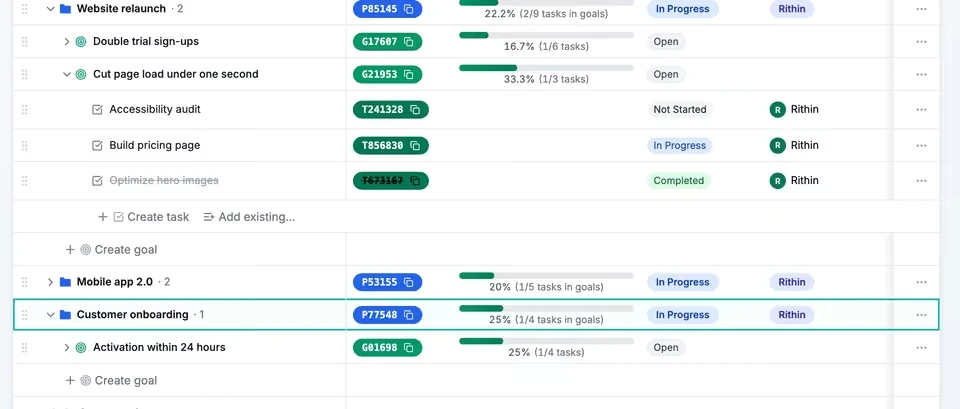
Name what success looks like
Each project's goals on one page, with the tasks under them and percent complete that rolls up as work is done. Switch to a timeline to see every dated goal at once.
- Progress rolls up automatically
- List or timeline view
- Drag a goal to another project, tasks and all
Also in every workspace: sprints and team capacity, task dependencies, comments with @mentions, attachments, sections, pinned projects and keyboard shortcuts (⌥N creates a task from anywhere).
Let AI agents do real work, with a person in charge.
Agents work where your team works
Connect an AI tool over MCP, or call the REST API or the Python SDK. Agents create and update tasks, projects, goals and milestones in the same workspace.
Marked, and held for review
Every task an agent creates carries a Bot mark. Hold agent tasks for a person to accept or reject: for private projects, for every agent task, or never.
On the record
Every agent action is in the audit log, under the token's or the app's name. An agent can never approve its own task.
Scoped, and revocable
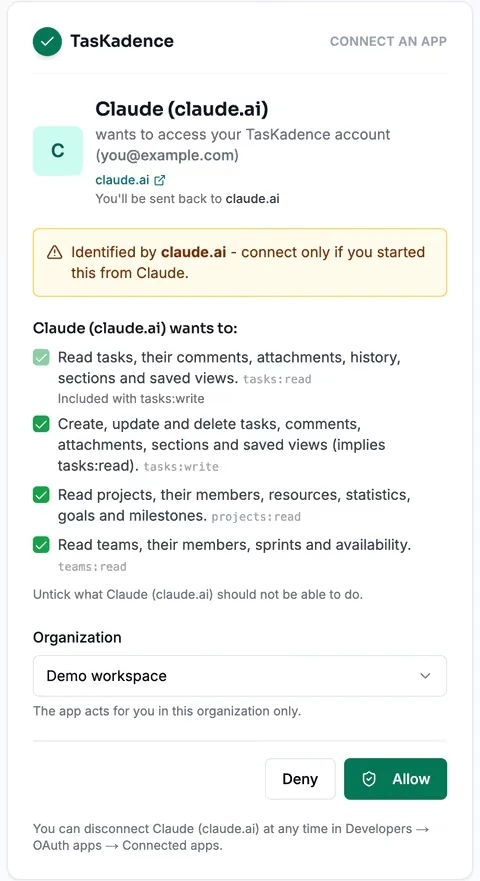
Read-only mode, tool groups and per-scope consent limit what a connection can do. Revoke a token or disconnect an app at any time.
Build on the same API the agents use.
Script it, automate it or plug it into your own tools, with the same API your agents use.
REST API
/v1Every object your team works with, over JSON: tasks, projects, goals, milestones, teams, sprints and webhooks.
Python SDK + CLI
taskadence · tmA typed client with pagination, retries and typed errors, and a command line for scripts.
MCP server
remote · localOne server for AI tools: connect over OAuth or with a token, read-only if you like, with the tool groups you pick.
Access you can see, scope and take back.
Org-bound access
A token belongs to one organization; an app connection acts in the one organization chosen at consent.
Scopes and token policy
Namespaced scopes on every token. Owners can require expiry, cap token lifetime and turn off personal tokens.
Audit log
Who did what and when, for people, tokens and apps, with retention you set and CSV export.
Signed webhooks
HMAC-SHA256 in the Standard Webhooks format, with retries, a delivery log and replay.
Data per organization
Isolation enforced in the API, backed by Postgres row-level security.
Sign-in
Email codes with two-step sign-in, Google and Microsoft sign-in, and SAML single sign-on.
Start free with your whole team.
Every feature, for every person in your organization. See how storage works on the pricing page.
What is TasKadence?
A work management app by Indrasol. Plan projects, goals and milestones, and track every task to done, with your people and your AI agents working in the same place.
How do AI agents work in TasKadence?
Connect an AI tool over the MCP server, or use the REST API or Python SDK. Agents can then create and update tasks, comments, projects, goals, milestones, teams and sprints, within the access you give them.
Can an agent's work go live without a person checking it?
Your organization decides. Agent tasks can be held as Needs review for private projects, for every agent task, or never. Rejecting a task archives it; nothing is deleted. An agent can never approve its own task.
Which AI tools can connect?
Claude, Claude Code, Cursor, VS Code, GitHub Copilot, Codex, Gemini CLI, Windsurf, Zed and any other client that speaks MCP, all through one MCP server.
Will I know when work is assigned to me?
Yes. TasKadence emails you when a task is assigned to you.
How do people sign in?
With a one-time email code and optional two-step sign-in, with Google or Microsoft, or through SAML single sign-on that you set up.
How do we get started?
Create a free account, make an organization and a project, add a few tasks and invite your team. The TasKadence guide walks through every feature.
Put your goals and your agents to work.
Start free with your team, or book a demo and we'll show you TasKadence with your own projects.