
 Bizradar
 Tanva
Hidden Cloud Security Risks Across AWS, Azure and GCP
Summary
Running workloads across AWS, Azure, and Google Cloud gives enterprises flexibility, but it also creates security gaps that are difficult to identify across different platforms. Discover the hidden cloud risks security teams often miss, how provider-specific misconfigurations create exposure, and how to strengthen multi-cloud security through continuous assessment and remediation.
Why Multi-Cloud Environments Create Hidden Security Risks
Many enterprises use more than one cloud provider to support applications, databases, analytics, storage, and business operations. AWS may host production workloads, Azure may support enterprise applications, and Google Cloud may power data analytics or machine learning services.
This flexibility also creates a fragmented security environment. Each provider uses different identity models, configuration settings, security controls, logging capabilities, and policy enforcement mechanisms.
A configuration that appears secure in one cloud may not have an equivalent implementation in another. Security teams can also miss risks when they review each cloud environment separately without understanding how resources and permissions connect.
The challenge is not simply finding individual misconfigurations. It is understanding how those configurations combine to create a larger security exposure.
Six Hidden Cloud Security Risks Security Teams Should Investigate
Some cloud security risks are easy to identify, while others remain hidden in resource relationships, access policies, and configuration differences.
The following areas deserve attention during a cloud security posture assessment.
1. Publicly Exposed Storage and Unintended Data Access
Cloud storage is frequently used for application files, backups, customer records, logs, and business documents. A storage resource may become exposed when public access settings, access policies, or network restrictions are configured incorrectly.
The risk is not limited to intentionally public storage. A temporary configuration change or an overly broad access policy can expose information that was never intended to be accessible externally.
Security teams should investigate:
- Publicly accessible storage buckets and containers
- Storage policies that allow broad access
- Unrestricted network access to storage endpoints
- Sensitive information stored in exposed locations
- Unused access permissions and shared credentials
- Inconsistent encryption and data protection settings
For example, AWS provides S3 Block Public Access controls, Azure supports storage firewalls and private endpoints, and Google Cloud provides organization policies to prevent public bucket access. These controls need to be configured and validated across the relevant accounts and resources.
2. Excessive Identity and Access Management Permissions
Identity-related misconfigurations are among the most important cloud risks to investigate.
Users, applications, workloads, and automated services require permissions to access cloud resources. However, broad roles and inherited permissions can give an identity more access than its business function requires.
This becomes difficult to manage in multi-cloud environments because AWS IAM, Microsoft Entra ID and Azure RBAC, and Google Cloud IAM use different permission structures.
Common warning signs include:
- Administrator-level access assigned unnecessarily
- Overly broad wildcard permissions
- Unused service accounts and application identities
- Long-lived credentials without appropriate rotation
- Excessive cross-account or cross-project access
- Inherited permissions that are not regularly reviewed
Security teams should examine effective permissions rather than relying only on the roles directly assigned to an identity.
For example, a workload identity may appear to have limited access in its primary project but could inherit broader permissions through a parent resource or connected service.
3. Network Exposure Hidden Across Cloud Environments
Cloud network configurations determine which systems can communicate with applications, databases, and internal services.
Security gaps can appear when teams create temporary firewall exceptions, expose management ports, or allow unrestricted inbound and outbound traffic.
These changes may be difficult to detect when different teams manage networking across separate cloud providers.
Review the following:
- Public IP addresses assigned to sensitive workloads
- Open inbound ports and unrestricted firewall rules
- Overly permissive security groups and network security groups
- Unnecessary internet-facing management interfaces
- Weak segmentation between production and development
- Unrestricted communication between cloud environments
- Unreviewed VPN, peering, and hybrid connectivity routes
A single exposed workload may become an entry point into other connected resources. Network security reviews should therefore examine connectivity and resource relationships, not just individual firewall rules.
4. Unmonitored Cloud Configuration Changes
Cloud infrastructure changes frequently as engineering teams deploy applications, update services, and scale workloads.
A resource may initially meet the organization's security baseline but become less secure after a configuration change. This is commonly known as configuration drift.
For example, a developer may temporarily enable public access to troubleshoot an application. If the change is not reviewed or reverted, the exposure can remain after the original requirement has ended.
Security teams should monitor:
- Changes to storage access policies
- Modifications to IAM roles and permissions
- Firewall and network configuration updates
- Disabled logging or monitoring services
- Changes to encryption settings
- New cloud accounts, subscriptions, or projects
- Security policies that are modified or bypassed
Continuous cloud compliance monitoring helps identify these changes before they become long-term security problems.
5. Weak Visibility Into Service Accounts, Keys, and Secrets
Applications and automated workloads often use service accounts, API keys, access tokens, and other credentials to communicate with cloud services.
These credentials can become security risks when they are stored incorrectly, shared between workloads, or left active after their original purpose has ended.
A compromised credential may provide access to resources beyond the application for which it was originally created.
Security teams should check for:
- Unused or inactive service accounts
- Long-lived access keys and credentials
- Secrets stored in application code or configuration files
- Shared credentials across multiple workloads
- Excessive permissions assigned to automated identities
- Missing credential rotation and lifecycle policies
Credential management should be part of every multi-cloud security assessment, especially when applications communicate across multiple providers.
6. Compliance Gaps Between Cloud Providers
Organizations working toward SOC 2, ISO 27001, HIPAA, or other security requirements must demonstrate that their controls operate consistently across their cloud environments.
However, security policies are not always implemented uniformly.
One AWS account may enforce encryption and logging requirements, while a separate Azure subscription or Google Cloud project may have different settings. These inconsistencies can create compliance gaps that are difficult to identify through periodic manual checks.
Common issues include:
- Different security baselines across cloud providers
- Inconsistent encryption and access policies
- Missing configuration evidence
- Unmonitored policy exceptions
- Incomplete asset inventories
- Delayed remediation of compliance findings
A centralized view of cloud controls helps security teams identify where requirements are being met and where additional action is needed.
Cloud-Specific Security Risks Across AWS, Azure and GCP
Although the security objectives are similar, each cloud provider has its own configuration model and security capabilities.
Understanding these differences helps security teams avoid applying a single generic checklist to every environment.
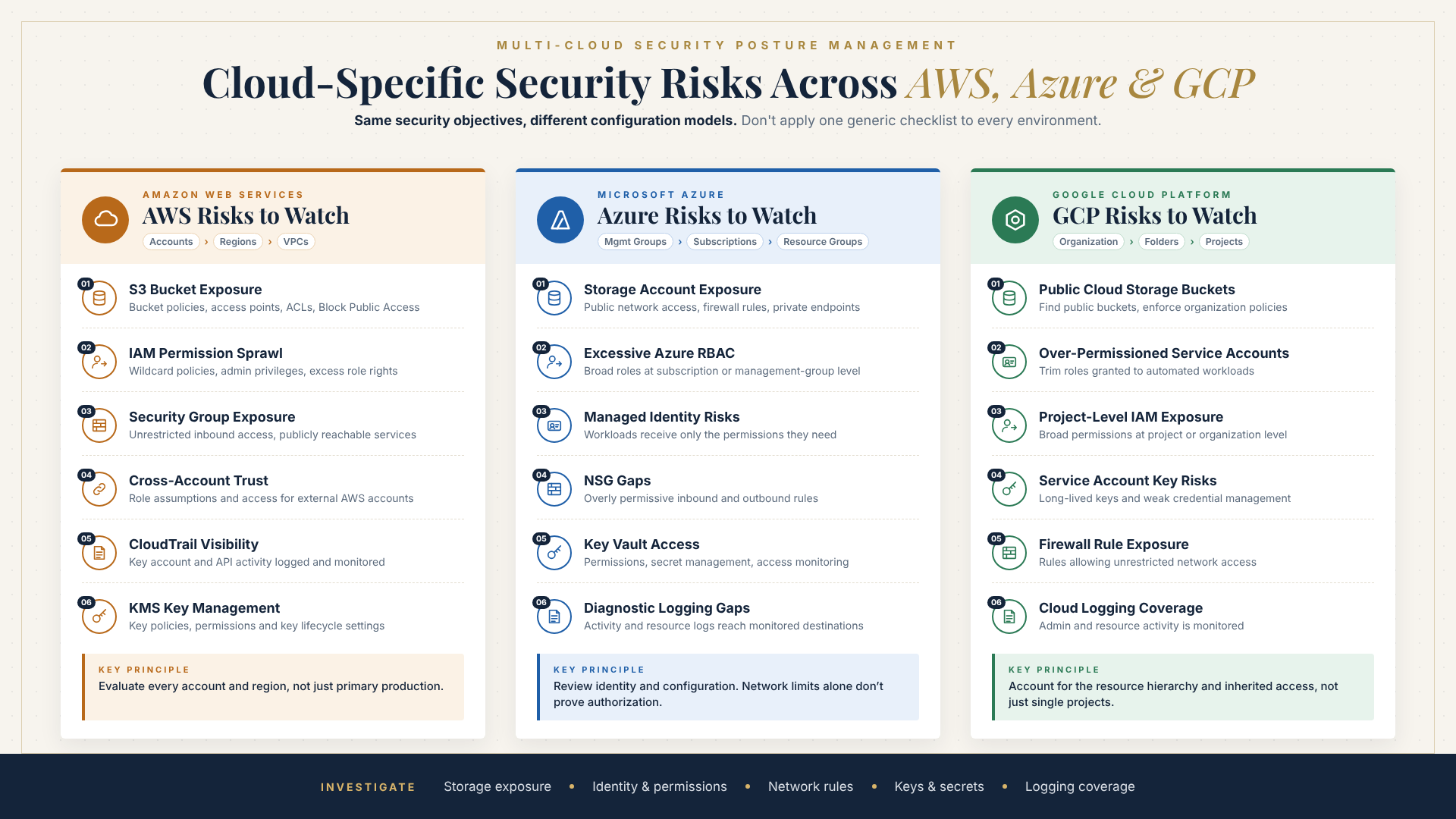
AWS Security Risks to Watch
Amazon Web Services environments commonly use multiple accounts, IAM roles, S3 storage, virtual private clouds, and automated workloads. Security gaps can emerge when these resources are configured independently.
Key areas to investigate include:
- S3 bucket exposure: Review bucket policies, access points, ACLs, and Block Public Access settings.
- IAM permission sprawl: Identify wildcard policies, unnecessary administrative privileges, and excessive role permissions.
- Security group exposure: Investigate unrestricted inbound access and publicly reachable services.
- Cross-account trust: Review role assumptions and permissions granted to external AWS accounts.
- CloudTrail visibility: Verify that important account and API activity is logged and monitored.
- KMS key management: Review key policies, permissions, and key lifecycle settings.
AWS security posture management should evaluate resources across all relevant accounts and regions rather than focusing only on the primary production account.
Azure Security Risks to Watch
Microsoft Azure environments often involve subscriptions, resource groups, virtual networks, storage accounts, managed identities, and Microsoft Entra ID.
Security teams should examine:
- Storage account exposure: Review public network access, firewall rules, and private endpoint configurations.
- Excessive Azure RBAC permissions: Identify broad role assignments and unnecessary access at subscription or management-group level.
- Managed identity risks: Confirm that applications and workloads receive only the permissions they need.
- Network Security Group gaps: Investigate overly permissive inbound and outbound rules.
- Key Vault access: Review permissions, secret management, and access monitoring.
- Diagnostic logging gaps: Verify that important activity and resource logs reach monitored destinations.
Azure security posture management should include both identity and resource configuration reviews. Restricting network access alone does not establish that a caller is authorized to access data.
GCP Security Risks to Watch
Google Cloud environments organize resources through organizations, folders, projects, service accounts, and IAM policies.
Some security gaps can remain hidden in inherited permissions and automated identities.
Important areas to review include:
- Public Cloud Storage buckets: Identify buckets with public access and enforce appropriate organization policies.
- Over-permissioned service accounts: Review roles granted to automated workloads and remove unnecessary permissions.
- Project-level IAM exposure: Investigate broad permissions assigned at project or organization level.
- Service account key risks: Identify unnecessary long-lived keys and improve credential management.
- Firewall rule exposure: Review rules that allow unrestricted network access.
- Cloud logging coverage: Confirm that important administrative and resource activities are monitored.
GCP security posture management should account for the resource hierarchy and inherited access policies, not just individual project configurations.
Why Separate Cloud Security Dashboards Are Not Enough
Many organizations use native security tools provided by their cloud platforms. These tools are valuable for identifying configuration issues within their respective environments.
However, managing three separate dashboards can make it difficult to establish a consistent enterprise-wide security posture.
Consider an organization operating:
- AWS for production applications and object storage
- Azure for enterprise identity and business applications
- GCP for analytics and data processing
Each environment may report its own configuration findings. Security teams then need to compare alerts, validate priorities, identify related resources, and coordinate remediation across different engineering teams.
This creates several operational challenges:
Inconsistent risk prioritization: Each platform may present findings differently, making cross-cloud comparison difficult.
Fragmented ownership: Security findings may be assigned to different teams without a common remediation process.
Incomplete attack visibility: Individual alerts may not reveal how exposed resources, excessive permissions, and network connections combine.
Delayed remediation: Teams may spend more time reviewing dashboards and validating alerts than fixing the highest-impact risks.
A multi-cloud security assessment helps bring these findings into a consistent risk-management process.
How Cloud Attack Path Analysis Reveals Hidden Exposure
Not every critical configuration finding represents an immediate security threat. Its actual impact depends on whether an attacker can reach the resource and what access becomes possible afterward.
This is where cloud attack path analysis becomes important.
Instead of reviewing findings independently, security teams examine how different weaknesses can connect.
For example:
- A workload has an internet-accessible management interface.
- The workload uses an identity with broader permissions than required.
- That identity can access a storage resource containing sensitive information.
- The storage resource has insufficient access restrictions.
Each issue may appear as a separate finding. Together, they can represent a potential route to sensitive data.
Cloud attack path analysis helps teams understand these relationships and prioritize risks based on reachability, permissions, resource importance, and potential impact.
This approach can reduce alert fatigue by helping engineers focus on exposures that create meaningful business risk.
How to Conduct a Multi-Cloud Security Assessment
An effective multi-cloud security assessment should provide a consistent view of assets, configurations, identities, and exposure across AWS, Azure, and GCP.
A practical assessment can follow these steps.
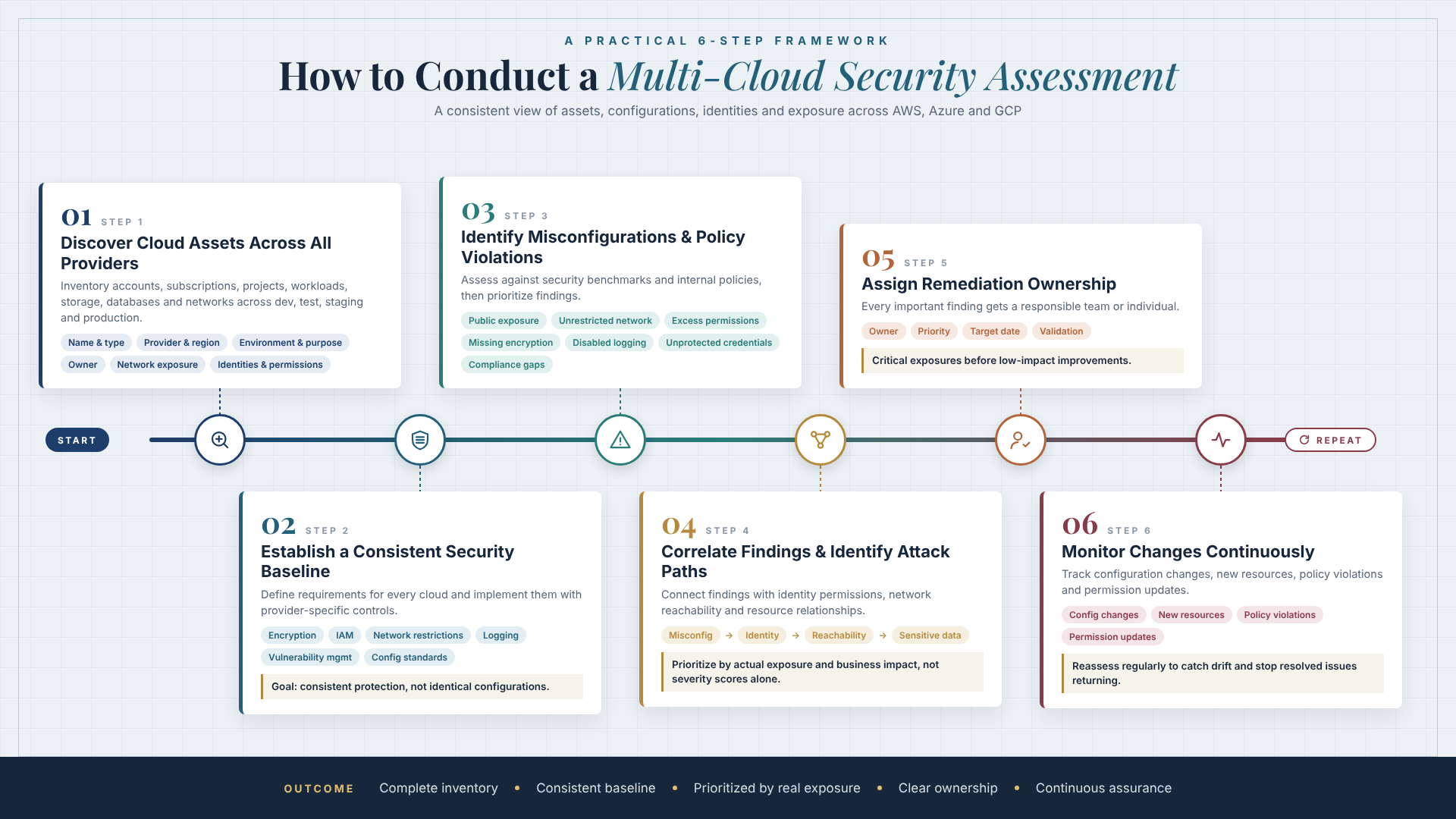
Step 1: Discover Cloud Assets Across All Providers
Start by identifying cloud accounts, subscriptions, projects, workloads, storage resources, databases, and network components.
Include development, testing, staging, and production environments.
A complete inventory should capture:
- Resource name and type
- Cloud provider and region
- Environment and business purpose
- Resource owner
- Network exposure
- Associated identities and permissions
Step 2: Establish a Consistent Security Baseline
Define the security requirements that should apply across cloud environments.
These may include encryption, identity and access management, network restrictions, logging, vulnerability management, and resource configuration standards.
Use provider-specific controls to implement equivalent security objectives. The goal is consistent protection, not identical configurations across platforms.
Step 3: Identify Misconfigurations and Policy Violations
Perform a cloud misconfiguration assessment against relevant security benchmarks and internal policies.
Prioritize findings such as:
- Publicly exposed resources
- Unrestricted network access
- Excessive permissions
- Missing encryption controls
- Disabled security logging
- Unprotected credentials
- Inconsistent compliance settings
Step 4: Correlate Findings and Identify Attack Paths
Connect configuration findings with identity permissions, network reachability, and resource relationships.
This helps determine whether an issue can expose a sensitive resource or provide access to another part of the environment.
Prioritize based on actual exposure and business impact rather than severity scores alone.
Step 5: Assign Remediation Ownership
Every important finding should have a responsible team or individual.
Define remediation priorities, target dates, and validation requirements. Critical exposures should receive faster attention than low-impact configuration improvements.
Step 6: Monitor Changes Continuously
Cloud security should not stop after the initial assessment.
Monitor configuration changes, new resources, policy violations, and permission updates. Reassess environments regularly to identify configuration drift and verify that previously resolved issues do not return.
How CSPM Helps Secure AWS, Azure and GCP
Cloud Security Posture Management (CSPM) provides continuous visibility into cloud configurations, security policies, and compliance gaps.
A CSPM approach helps organizations move beyond occasional configuration reviews and establish a repeatable process for identifying and addressing cloud risks.
Key capabilities include:
- Asset discovery: Identify cloud resources across accounts, subscriptions, and projects.
- Misconfiguration detection: Find insecure settings and policy violations.
- Identity risk visibility: Identify excessive permissions and risky access relationships.
- Attack path analysis: Connect exposures and permissions to understand potential attack routes.
- Compliance monitoring: Map cloud configurations to relevant security and compliance requirements.
- Remediation tracking: Assign findings, monitor progress, and validate completed fixes.
Organizations can use these capabilities through their existing cloud security tools or a dedicated CSPM platform.
For teams that need additional operational support, managed CSPM services can help with continuous monitoring, alert triage, risk prioritization, and remediation coordination.
Explore Indrasol's Cloud Security Posture Management services to learn how cloud security assessments, continuous monitoring, and remediation support can strengthen multi-cloud environments.
When Should Organizations Consider CSPM Consulting?
Not every organization has the internal resources to manage cloud security findings across multiple providers.
CSPM consulting can help when security teams need guidance on assessment methodology, security baseline design, tool selection, or remediation planning.
Consider CSPM consulting when:
- Your organization is expanding from one cloud provider to multiple providers.
- Security teams cannot maintain a complete cloud asset inventory.
- Native cloud tools generate more findings than teams can investigate.
- Misconfigurations repeatedly appear after deployments.
- Your organization needs a cloud security posture assessment before an audit.
- You need a structured remediation roadmap.
- You want to improve cloud compliance monitoring across AWS, Azure, and GCP.
The right CSPM services should support both technical security improvements and the operational processes needed to maintain them.
Cloud Security Controls for SOC 2 and ISO 27001
Cloud security posture management can also support organizations working toward SOC 2 and ISO 27001.
Both frameworks require organizations to establish and operate appropriate security controls. Cloud configurations can provide technical evidence that supports those control activities.
Examples include:
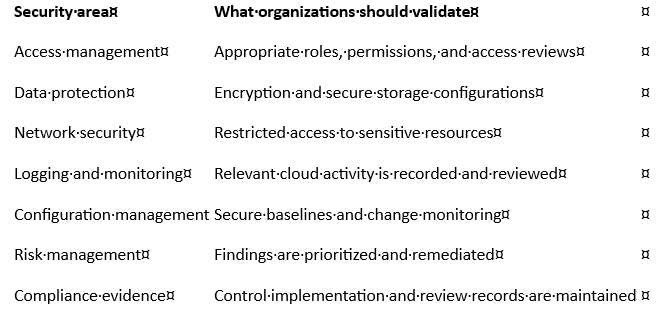
CSPM for SOC 2 and ISO 27001 can help organizations identify configuration gaps and maintain evidence of cloud security controls.
However, CSPM does not replace a complete compliance program. Policies, risk assessments, operational procedures, and other required controls must also be addressed.
A Practical Multi-Cloud Security Checklist
Security teams can use this checklist during a cloud security posture assessment.
- Maintain an inventory of AWS accounts, Azure subscriptions, and GCP projects.
- Identify publicly exposed storage resources.
- Review IAM roles, service accounts, and inherited permissions.
- Investigate unrestricted network access and firewall rules.
- Validate encryption and key management configurations.
- Review API keys, secrets, and long-lived credentials.
- Confirm that cloud activity logging is enabled and monitored.
- Identify configuration drift and unapproved changes.
- Map cloud resources to SOC 2 and ISO 27001 controls where applicable.
- Investigate potential cloud attack paths.
- Assign owners and deadlines to high-priority findings.
- Verify remediation and monitor recurring issues.
Frequently Asked Questions
What are the most common hidden cloud security risks?
Common risks include publicly exposed storage, excessive IAM permissions, unrestricted network access, weak credential management, configuration drift, and incomplete security monitoring. In multi-cloud environments, inconsistent policies across providers can make these issues harder to identify.
What is a multi-cloud security assessment?
A multi-cloud security assessment evaluates the configuration, identity permissions, network exposure, and security controls across multiple cloud providers. It helps organizations identify gaps and prioritize remediation consistently across AWS, Azure, and GCP.
How does CSPM help secure AWS, Azure, and GCP?
CSPM helps identify cloud misconfigurations, excessive permissions, policy violations, and compliance gaps. It provides visibility into cloud security posture and supports continuous monitoring and remediation across different providers.
What is the difference between CSPM and cloud security posture assessment?
Cloud security posture assessment is an evaluation of an environment's current security configuration and risks. CSPM is the broader ongoing discipline of identifying, monitoring, prioritizing, and addressing cloud posture issues over time.
Can CSPM help with SOC 2 and ISO 27001?
Yes. CSPM can support technical control monitoring, configuration reviews, and evidence collection relevant to SOC 2 and ISO 27001. However, it does not independently satisfy all requirements of either framework.
What is cloud attack path analysis?
Cloud attack path analysis examines how exposed resources, identities, permissions, and network connections may combine to create routes an attacker could exploit. It helps security teams prioritize connected risks rather than reviewing isolated findings.
When should an organization consider managed CSPM services?
Managed CSPM services may be useful when an organization lacks the internal resources to continuously review cloud findings, manage security tooling, prioritize risks, and coordinate remediation across multiple cloud providers.
Strengthen Cloud Security Before Misconfigurations Become Exposure
Securing AWS, Azure, and GCP requires more than enabling individual security features. Organizations need consistent visibility into cloud assets, identity permissions, network exposure, and configuration changes.
A structured multi-cloud security assessment helps reveal risks that separate cloud dashboards and periodic manual reviews may overlook.
With cloud security posture management, continuous monitoring, attack path analysis, and timely remediation, security teams can build a more consistent approach to protecting enterprise cloud environments.
Learn how Indrasol's CSPM services can help identify hidden cloud risks, strengthen multi-cloud security, and improve ongoing compliance visibility.
About the Author
Brahma Guptha Illindra
Brahma Gupta is a technology entrepreneur, enterprise technology leader, and Founder & CEO of Indrasol, helping organizations adopt AI, cloud, data, and cybersecurity technologies securely, compliantly, and at scale. Over the years, he has worked across enterprise architecture, data engineering, analytics, cloud technologies, Oracle EPM, and business transformation. Today, his focus is increasingly on one of the biggest challenges facing enterprises: how to adopt AI at scale without losing visibility, security, governance, or control. At Indrasol, he and his team help organizations bridge the gap between technology innovation and business risk across: • AI Security & AI-SPM (AI Security Posture Management) • AI Governance & Responsible AI • Cloud Security & CSPM (Cloud Security Posture Management) • Cybersecurity & Risk Management • SOC 2, ISO 27001, ISO 42001 & CMMC compliance • Cloud modernization & DevOps • Data, analytics & AI transformation • Enterprise technology & automation Brahma is particularly
View Brahma Guptha Illindra's profile