
AI Agent Access Reviews: Hidden Security Gaps
Summary
AI agents are gaining access to enterprise applications, business data, APIs, and connected tools. However, many organizations still review agent permissions using traditional user-access processes. This article explains the access review gaps security teams often miss and how to build a more effective AI agent access review process.
Why AI Agent Access Reviews Need a Different Approach
Enterprise AI agents are no longer limited to answering questions or generating content. They can retrieve information, interact with business applications, access databases, and execute multi-step workflows.
As organizations connect more agents to enterprise systems, their access requirements become more complex. An agent may need access to several applications to complete one business task, and those permissions can change as its workflow evolves.
Traditional access reviews often focus on employees, departments, and job responsibilities. AI agents require a different level of review because their access is connected to specific tasks, integrations, tools, and automated workflows.
An effective AI agent access review should answer more than whether an agent has permission. Security teams must establish whether that permission is still necessary, properly scoped, approved, and aligned with the agent's current business purpose.
What Is an AI Agent Access Review?
An AI agent access review is a structured process for examining the permissions, roles, integrations, and resource access assigned to an AI agent.
The objective is to verify that every agent has appropriate access to perform its approved responsibilities without retaining unnecessary privileges.
A review should examine:
- Assigned permissions: Which roles and access rights have been granted?
- Resource access: Which applications, databases, APIs, and cloud resources can the agent reach?
- Business purpose: Are the permissions still required for the agent's intended function?
- Ownership: Who is responsible for approving and maintaining the agent's access?
- Access changes: Have new permissions or integrations been introduced?
- Unused access: Are permissions still assigned even though the agent no longer uses them?
For example, an AI agent initially created to retrieve customer support information may later receive access to ticket management, customer databases, and reporting tools. Its original access approval may no longer represent its current capabilities.
Access reviews help organizations identify these changes before unnecessary permissions become long-term security exposures.
Six Access Review Gaps Security Teams Often Miss
Many organizations have identity management processes, but those processes do not always account for how AI agents operate. The following gaps deserve specific attention.
1. Reviewing Initial Permissions Instead of Current Access
One common mistake is treating the permissions approved during deployment as permanently valid.
AI agents evolve. Teams introduce new integrations, connect additional data sources, and expand workflows. Each change can affect the agent's effective access.
A review based only on the original configuration may miss permissions added later.
Security teams should compare the agent's current access against its approved baseline. They should also identify changes that were introduced through application updates, integration settings, role assignments, or administrative exceptions.
What to verify:
- Current permissions compared with the original approval
- Newly added application and API access
- Changes to resource-level permissions
- Access granted outside the approved workflow
- Permissions that no longer support the agent's business purpose
2. Missing Business Owners and Access Review Approvers
An access review is difficult to complete when nobody is accountable for the agent.
In some organizations, developers create agents, IT teams manage integrations, and business departments use the workflows. However, responsibility for approving continued access may not be clearly assigned.
Without an accountable owner, permissions can remain active even after the original use case changes or the agent is no longer required.
Every production AI agent should have a designated business owner and a technical owner.
The person approving access should understand the agent's business purpose and the consequences of retaining its permissions.
3. Overlooking Permissions Across Connected Applications
An AI agent may appear to have limited access within its primary platform. However, its connected tools and integrations may provide additional capabilities.
For example, an internal business agent could connect to:
- Microsoft 365 applications
- Customer relationship management platforms
- Cloud storage services
- Internal databases
- Enterprise APIs
- Third-party automation tools
Reviewing only the agent's primary application does not provide a complete picture.
Security teams should examine the permissions available through every connected service. They should also consider how permissions combine across those services.
A collection of individually reasonable permissions can create broader effective access when viewed together.
The important question is: What can the agent access across its complete integration environment, rather than what can it access in one application?
4. Keeping Permissions After the Business Requirement Changes
AI agent permissions can become outdated when business workflows change.
An agent may be reassigned to another department, replaced by a newer workflow, or disconnected from a business process. However, its previous permissions may remain active.
This creates unnecessary access that may not be visible during routine security checks.
Security teams should review permissions whenever important lifecycle events occur, including:
- A change in the agent's business purpose
- A new application or integration being introduced
- A change in the agent's owner
- A workflow being retired or replaced
- A change in the data or resources required
- An agent being suspended or decommissioned
Access should be updated when the business requirement changes, rather than waiting for the next scheduled review.
5. Treating Unused Permissions as Low Priority
Unused permissions are often overlooked because they do not appear to affect day-to-day operations.
However, an agent retaining access to an application or resource it no longer needs creates avoidable exposure.
For example, an AI agent might have been granted access to a reporting database during a pilot project. The project may have ended, but the database permission could remain active.
Security teams should compare assigned permissions with actual usage records.
They should investigate:
- Permissions that have not been used for an extended period
- Integrations that are no longer active
- Access to retired applications
- Temporary permissions that were never removed
- Agents that have no recent business activity
Unused access should be validated with the owner before removal. Some permissions may support infrequent but legitimate business tasks.
6. Failing to Verify Whether Access Was Actually Removed
Identifying excessive permissions is only one part of an access review. Security teams must also confirm that approved remediation actions have been completed.
For example, a review may identify an unnecessary API permission. The team records a remediation task, but nobody verifies whether the permission was actually removed from the connected application.
This creates a gap between access review results and the organization's actual security posture.
Every review should include:
- A documented access decision
- An assigned remediation owner
- A target completion date
- Evidence of permission removal or modification
- A follow-up validation
- An exception approval, if access must remain
A review should not be marked complete simply because someone identified a problem. The organization should verify the resulting access state.
How to Conduct an Effective AI Agent Access Review
A repeatable review process helps security teams evaluate agent permissions consistently across departments and environments.
Step 1: Establish a Complete Agent Register
Start by maintaining a centralized inventory of AI agents operating across the organization.
For each agent, record:
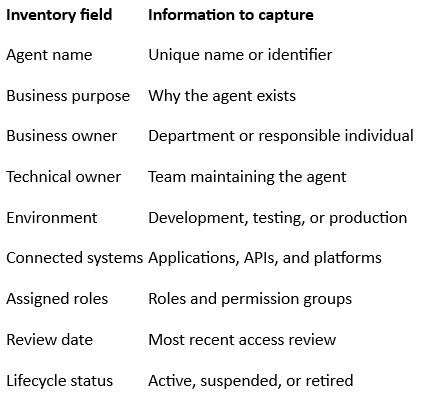
This register becomes the starting point for access certification and ongoing governance.
Step 2: Map Assigned and Effective Permissions
Collect the permissions assigned to each agent across its connected systems.
Do not rely only on the roles displayed in the agent's main platform. Examine the access granted through APIs, application roles, service accounts, delegated permissions, and external integrations.
Where possible, distinguish between:
- Direct permissions assigned to the agent
- Permissions inherited through groups or roles
- Delegated access granted through another identity
- Permissions available through connected tools
- Temporary or elevated access
This helps security teams understand the agent's effective access rather than reviewing individual permission records in isolation.
Step 3: Validate Access Against Business Requirements
Compare the agent's current access with its approved business purpose.
Ask the business owner and technical owner to confirm whether each permission is still necessary.
For every permission, establish:
- What business task requires this access?
- Which specific resources does it cover?
- Is the access broader than the task requires?
- Is the permission still being used?
- Can the same task be completed with a more restricted role?
Permissions without a clear business justification should be investigated and considered for removal.
Step 4: Identify and Prioritize Access Risks
Not every permission creates the same level of exposure.
An agent with access to a limited internal knowledge base presents a different risk from an agent with broad access to financial applications or production cloud resources.
Prioritize reviews using factors such as:
- Sensitivity of accessible information
- Business criticality of connected systems
- Scope of assigned permissions
- Number of connected applications
- External exposure
- Ability to perform sensitive operations
- Presence of unused or outdated access
This helps security teams focus remediation efforts on the most significant access risks.
Step 5: Approve, Modify, or Revoke Access
Each permission should receive a documented decision.
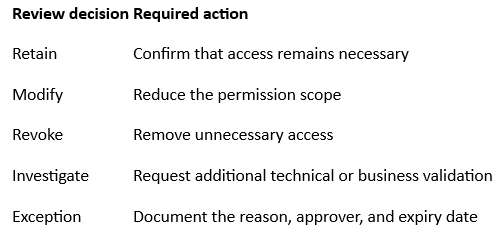
For temporary or elevated access, define an expiration mechanism wherever supported. Avoid allowing temporary approvals to become permanent permissions without a fresh review.
Step 6: Validate Remediation and Preserve Evidence
After access changes are completed, verify them in the relevant identity provider or connected application.
Maintain evidence that demonstrates:
- Who reviewed the agent
- Which permissions were examined
- What decisions were made
- Which permissions were changed or removed
- Who approved exceptions
- Whether remediation was verified
- When the next review is due
This evidence supports internal security assessments, audit activities, and governance reporting.
How Often Should Organizations Review AI Agent Access?
A single annual review may not be sufficient for agents whose workflows, integrations, and permissions change frequently.
Organizations should establish a risk-based review schedule based on the agent's business importance and access scope.
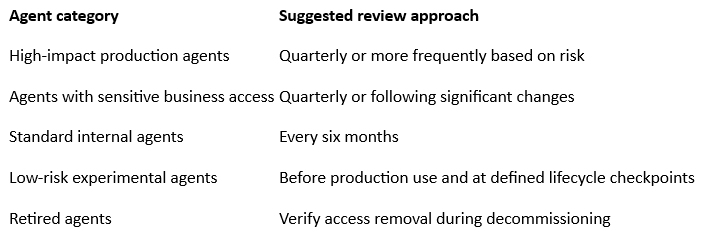
These are suggested operational intervals, not universal regulatory requirements. Organizations should align their schedules with internal policies, risk assessments, and applicable compliance obligations.
In addition to scheduled reviews, trigger an access review whenever an agent receives new integrations, changes business purpose, or moves into a more sensitive environment.
What Should Security Teams Measure?
Access review completion alone does not demonstrate that an organization's AI access risks are under control.
Security leaders should track measurable indicators that show whether permissions are being reviewed, corrected, and maintained.
Useful metrics include:
- Agent ownership coverage: Percentage of registered agents with assigned business and technical owners.
- Access review completion rate: Percentage of scheduled reviews completed within the defined period.
- Excessive permission findings: Number of agents with permissions beyond approved requirements.
- Stale access: Number of unused or outdated permissions identified.
- Remediation time: Average time required to resolve access review findings.
- Exception count: Number of active access exceptions and overdue approvals.
- Decommissioning coverage: Percentage of retired agents with verified access removal.
Tracking these metrics helps organizations identify recurring problems and improve the effectiveness of their AI access governance program.
How AI Security Posture Management Supports Access Reviews
AI Security Posture Management (AiSPM) can help organizations connect agent discovery, access visibility, risk assessment, and continuous monitoring.
Instead of treating access reviews as isolated administrative tasks, an AiSPM approach helps security teams understand how agent permissions contribute to the broader AI security posture.
It can support activities such as:
- Discovering AI agents and their connected resources
- Identifying identities, roles, and permission relationships
- Highlighting excessive or unexpected access
- Connecting access findings with business and technical context
- Identifying changes in AI configurations and integrations
- Prioritizing access risks based on potential impact
- Supporting continuous reassessment and remediation tracking
For organizations managing multiple AI platforms and integrations, this broader visibility can help reduce gaps between access governance and technical security operations.
Explore Indrasol's AI Security Posture Management services to understand how AI asset discovery, security risk assessment, and continuous posture improvement can support enterprise AI security.
AI Agent Access Review Checklist for Security Teams
Use this checklist to evaluate whether your organization has a consistent process for reviewing AI agent permissions.
- Maintain a centralized inventory of active AI agents.
- Assign a business owner and technical owner to every production agent.
- Document each agent's approved business purpose.
- Identify all connected applications, APIs, and tools.
- Review direct, inherited, and delegated permissions.
- Validate effective access across connected systems.
- Identify excessive, unused, and outdated permissions.
- Confirm that permissions match current business requirements.
- Establish risk-based review schedules.
- Trigger reviews when workflows or integrations change.
- Document access decisions and approved exceptions.
- Verify that unnecessary permissions have been removed.
- Preserve evidence of reviews and remediation.
- Confirm that retired agents no longer retain active access.
Frequently Asked Questions
What is an AI agent access review?
An AI agent access review is a process for examining the roles, permissions, integrations, and resource access assigned to an AI agent. It helps organizations confirm that the agent retains only the access required for its approved business purpose.
Why are AI agent access reviews important?
AI agents can connect to multiple enterprise applications and resources. Without regular reviews, they may retain outdated permissions, excessive access, or integrations that are no longer necessary.
How often should AI agent permissions be reviewed?
Review frequency should depend on risk and business impact. High-impact production agents may require quarterly reviews, while standard internal agents may be reviewed every six months. Significant workflow or permission changes should also trigger a review.
Who should approve AI agent access?
The business owner should confirm that the agent still needs the access, while the technical owner validates its implementation. Security teams should evaluate the associated risks and ensure that approval and remediation are documented.
What is the difference between an AI agent access review and a traditional user access review?
Traditional user access reviews generally examine employee roles and permissions. AI agent access reviews must also consider connected tools, automated workflows, application integrations, delegated access, and the agent's changing business purpose.
How does AiSPM help with AI agent access reviews?
AiSPM helps provide visibility into AI agents, their identities, integrations, permissions, and related security risks. This context can support more informed access reviews and help organizations identify changes that require investigation.
Make AI Agent Access Reviews Part of Continuous Security
AI agent deployments are evolving, and access requirements can change as quickly as the workflows they support.
Organizations that review only initial permissions or rely on occasional manual checks may miss outdated access, unapproved changes, and gaps in ownership.
A stronger approach combines centralized agent inventories, clear accountability, permission validation, risk-based reviews, and verified remediation.
The objective is not simply to complete another compliance checklist. It is to ensure that every AI agent continues to have the right access for the right business purpose.
Strengthen your enterprise AI security posture with better visibility into AI agents, their permissions, and their connected environments. Learn more about Indrasol's AI security capabilities.
About the Author
Brahma Guptha Illindra
Brahma Gupta is a technology entrepreneur, enterprise technology leader, and Founder & CEO of Indrasol, helping organizations adopt AI, cloud, data, and cybersecurity technologies securely, compliantly, and at scale. Over the years, he has worked across enterprise architecture, data engineering, analytics, cloud technologies, Oracle EPM, and business transformation. Today, his focus is increasingly on one of the biggest challenges facing enterprises: how to adopt AI at scale without losing visibility, security, governance, or control. At Indrasol, he and his team help organizations bridge the gap between technology innovation and business risk across: • AI Security & AI-SPM (AI Security Posture Management) • AI Governance & Responsible AI • Cloud Security & CSPM (Cloud Security Posture Management) • Cybersecurity & Risk Management • SOC 2, ISO 27001, ISO 42001 & CMMC compliance • Cloud modernization & DevOps • Data, analytics & AI transformation • Enterprise technology & automation Brahma is particularly
View Brahma Guptha Illindra's profile