
Building a Chatbot Using Generative AI on Databricks
ABSTRACT
Businesses are using generative AI chatbots more often, but creating one that delivers reliable, scalable, and accurate results is still tough. This blog looks at how to use Databricks to create and implement a generative AI chatbot that is ready for production and based on actual organizational data. The method outlined here uses retrieval augmented generation (RAG) to ensure that responses rely on relevant, up-to-date data stored in the Databricks lakehouse, rather than just a language model's general knowledge. The blog explains how the main technologies, including Mosaic AI, vector search, embeddings, and model serving, work together as a system. It also covers practical issues like data preparation, prompt design, performance optimization, and common pitfalls to avoid.
INTRODUCTION
Generative AI is a popular topic in company discussions, but it takes more than just contacting an API to be truly useful. When built correctly, chatbots can serve as helpful tools for navigating corporate knowledge. They can assist teams in finding precise answers without having to sift through tickets, dashboards, or documentation.
Databricks provides a strong framework for building such a system. It simplifies the preparation, management, and use of data by AI models. It combines data engineering, analytics, and machine learning into a single platform. Databricks lets you develop a chatbot as part of the larger data ecosystem instead of as a separate project.
This tutorial focuses on using Databricks to create a generative AI chatbot that is ready for production. It looks at choices in design, scalability, and maintainability. This guide is for technical leaders, data engineers, and machine learning engineers who want to understand how these systems work in real-world situations without unnecessary abstraction. The goal is to help you build a chatbot that is accurate, cost-effective, and suitable for real business environments.
WHAT IS A GENERATIVE AI CHATBOT ON DATABRICKS
Databricks' generative AI chatbot is a program that uses enterprise data and large language models to provide conversational, context-aware answers. This approach relies on language models that can understand natural language questions and generate dynamic responses. This is different from traditional rule-based or intent-driven chatbots. What makes a Databricks-based chatbot unique is its connection to data engineering, analytics, and governance processes.
Retrieval augmented generation (RAG) is the main part of this design. The chatbot gathers relevant information from a curated knowledge base stored in the Databricks lakehouse. It does not rely solely on its pre-training to answer questions. This information includes internal documentation, analytical results, and structured reference data. Semantic retrieval is done using vector search, which ensures that the chatbot provides contextually relevant information instead of simply matching keywords.
Databricks supports this concept through Mosaic AI, which offers tools for model orchestration, vector indexing, and creating embeddings. While machine learning engineers focus on how models perform and the quality of their answers, data engineers can handle data ingestion and transformation using established workflows. This fits well with current data pipelines. The chatbot is then made available as an API through model-providing endpoints. Various external and internal tools can access this API.
From a business viewpoint, this method has clear advantages. Responses are based on approved data, access can be managed with Unity Catalog, and it is possible to track the system's costs and performance. The end result is an AI-powered chatbot that acts as a dependable interface for company knowledge, rather than just a standard assistant.
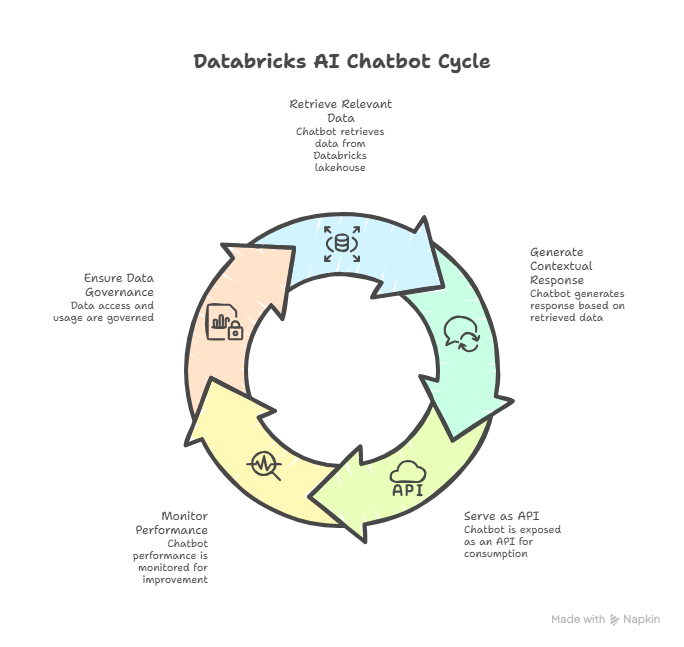
Fig 1 End-to-End Lifecycle of a Generative AI Chatbot on Databricks
KEY TECHNOLOGIES BEHIND THE CHATBOT
It takes more than just choosing a large language model to create an effective generative AI chatbot on Databricks. The quality of the system depends on how well various key technologies work together, from data collection to inference. By bringing these components into a single managed environment, Databricks simplifies long-term operations and development.
Most enterprise chatbot projects on Databricks use Mosaic AI and RAG architecture. Mosaic AI provides tools for managing foundation models, creating embeddings, and coordinating retrieval to improve generation operations. In a RAG setup, the chatbot first retrieves relevant context from enterprise data before giving it to the language model. This approach lowers the risk of speculative or unsupported responses and boosts response accuracy.
Semantic retrieval at scale is possible through vector search. Documents are transformed into meaning-capturing embeddings instead of depending on keyword matching. Similarity search methods like cosine similarity and approximate closest neighbor search are employed to query these embeddings, which are stored in vector tables. This helps the chatbot find relevant information even when the user phrases things differently from the original text. This method works well with the current data intake and transformation pipelines of data engineers.
Document chunking and embedding creation are crucial design processes. To strike a balance between retrieval accuracy and context coverage, documents need to be divided into sections of the right size. Effective chunking can enhance latency and relevance, while poor chunking often results in noisy or incomplete replies.
The final step in making the system work is model serving. The chatbot is presented as a scalable API with controlled inference behavior through Databricks model serving endpoints. Without leaving the Databricks platform, machine learning engineers can manage model versions, modify prompts, and monitor inference latency.
When these technologies come together, they create a logical generative AI workflow. Models remain visible, data remains managed, and the chatbot can adjust to changes in company knowledge. This integrated approach makes Databricks more suitable for conversational AI systems intended for production rather than for standalone trials.
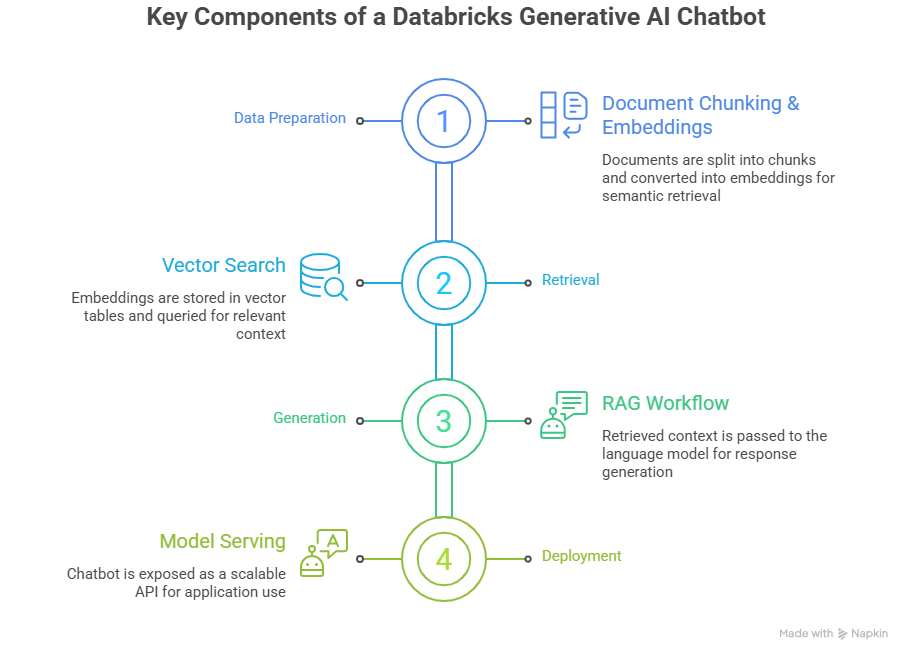
Fig 2 Core Components of a Generative AI Chatbot Architecture on Databricks
STEP-BY-STEP GUIDE TO BUILDING A CHATBOT ON DATABRICKS
This section outlines a practical, end-to-end approach to building a generative AI chatbot on Databricks. The steps are intentionally structured to align with how data and machine learning teams already work, rather than introducing parallel systems or one-off tooling.
Prepare the Databricks Workspace
Make sure the Databricks workspace is set up for generative AI tasks first. This usually entails confirming access to Mosaic AI capabilities, enabling Unity Catalog for data governance, and allocating compute for vector search and model inference. Because chatbot behavior frequently changes during iterative testing, it is crucial from an operational perspective to keep development and production environments apart as soon as possible.
At this point, access control needs to be specified. Permissions on source data and model endpoints must be uniformly enforced because chatbots frequently reveal private corporate information. This is made easier by Databricks' native security model, which applies governance policies to data, embeddings, and model artifacts.
Ingest and Prepare Knowledge Data
The quality of a chatbot's knowledge base directly impacts the quality of its responses. Internal documentation, PDFs, wiki pages, and structured tables serve as source data. Data engineers should aim to create reliable ingestion pipelines that normalize formats and eliminate duplication.
After ingestion, documents need to be cleaned and divided. Document chunking is an important step. Chunks should be large enough to keep context but small enough to maintain relevance during retrieval. It's essential to keep metadata like document source, version, and access level, as this information can be useful for filtering during retrieval.
Generate Embeddings and Create a Vector Index
After preparation, a supported embedding model transforms text segments into embeddings. The chatbot can then perform similarity-based retrieval thanks to these embeddings, which capture semantic meaning. These vectors can be stored in organized tables that connect easily with current data workflows using Databricks.
Next, a vector index is created to support effective semantic search. Teams should check the retrieval quality by sending sample queries and reviewing the returned documents. This validation phase is much easier to address early on than after deployment. It often reveals issues with the chunking strategy or missing metadata.
Build the RAG Pipeline
User queries are connected to the language model and the vector search layer via the retrieval augmented generation pipeline. The most pertinent results are chosen as context once a query is embedded and compared to the vector index. The language model then receives the context as part of a structured prompt.
Careful consideration should be given to prompt design. The model should be explicitly instructed by prompts to rely on recovered context and refrain from conjecture. Guidelines for tone, citation style, and backup responses in the event of lacking material are frequently helpful for enterprise use cases.
Deploy the Chatbot Using Model Serving
Databricks model serving can be used to package and deploy the RAG pipeline once it exhibits desired behavior. As a result, the chatbot is shown as a reliable API endpoint that can grow in response to demand. Teams can alter models, retrieval logic, or prompts without interfering with downstream users thanks to versioning.
Monitoring inference delay and error rates is crucial from a reliability perspective. Teams may better understand how the chatbot functions under actual usage patterns by utilizing Databricks' observability features.
Test, Validate, and Iterate
Functional correctness should not be the only thing tested. Determine whether the answers are correct, supported by the underlying data, and in line with the expectations of the organization. User feedback loops are very useful for improving prompt structure and retrieval logic.
A good chatbot is dynamic. Indexes, embeddings, and ingestion pipelines need to be updated as enterprise data changes. Databricks reduces operational overhead by integrating this continuous maintenance into the same platform that was used to create the system.
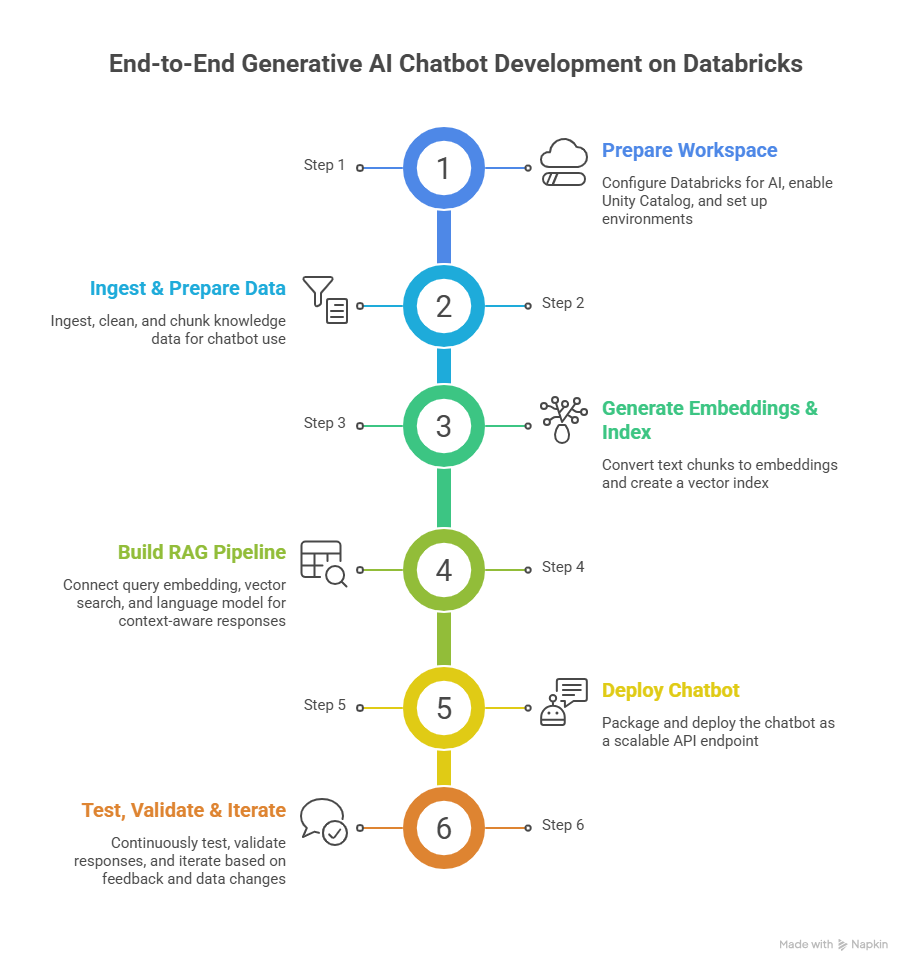
Fig 3 End-to-End Generative AI Chatbot Development on Databricks
BEST PRACTICES FOR PERFORMANCE AND COST OPTIMIZATION
Performance and cost are as important as response quality for generative AI chatbots in production. Inference delays and model usage costs can increase unexpectedly if not managed. Databricks offers several tools to help teams address these issues while maintaining accuracy.
One effective method is semantic caching. Many chatbot questions are similar or repeated. The system can skip unnecessary model inference and vector search operations by storing embeddings and answers for common questions. This cuts down overall computation and response time, especially in internal applications with high traffic.
Another key factor is retrieval design efficiency. Answer relevance and latency improve when the number of retrieved chunks is limited to what the model can handle. Retrieving too many chunks often slows down inference, leads to longer prompts, and increases token usage without significant accuracy benefits. Using metadata filters during vector search sharpens results and cuts down on unnecessary processing.
Teams should regularly monitor inference latency and throughput from a model serving viewpoint. Autoscaling is available through Databricks model serving; however, scaling strategies should reflect actual usage patterns. Under-provisioning can hurt the user experience, while over-provisioning results in unnecessary costs. Regular load testing helps achieve the right balance.
Timely efficiency matters. When prompts are well-structured and provide clear guidance for the language model, there is less need for long context or repeated instructions. This leads to more consistent responses and reduces token usage.
Observability and governance are crucial, too. By tracking query volumes, response times, and retrieval effectiveness, teams can quickly spot inefficiencies. In business environments, a Databricks-based chatbot can scale reliably while keeping performance and cost in mind during the design process.
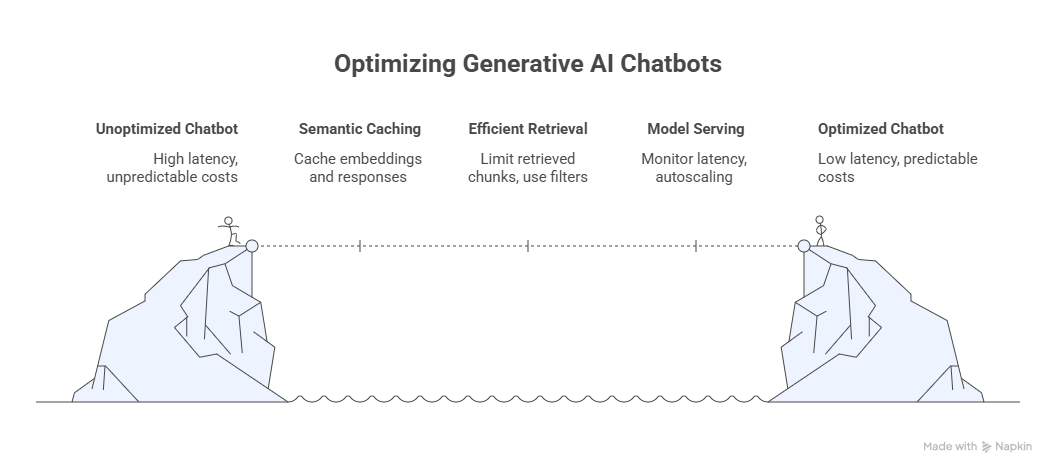
Fig 4 Optimization Journey for Enterprise Generative AI Chatbots
DEPLOYING A CUSTOM CHAT UI
Only when a generative AI chatbot has an easy-to-use interface will it be seen as truly valuable. Databricks offers several ways to deploy chatbots, but creating a custom chat user interface ensures that it meets user workflows, organizational branding, and security rules.
Choosing the platform is the first step. For business use, internal web apps, portals, or even Microsoft Teams integrations are common choices. To use the Databricks model serving API, a simple React or Vue frontend is usually enough. This frontend handles user input, sends queries to the RAG pipeline endpoint, and quickly displays the answers.
Both security and access control are crucial. In order to guarantee that only authorized users can access important information or query results, the chat user interface should adhere to the same permissions that are enforced in the Databricks Unity Catalog. Using SSO or OAuth for authentication gives an extra degree of security for enterprise deployments.
Custom UIs can also include features such as:
- Conversation history, which lets viewers view background information from earlier exchanges..
- Source attribution, which identifies the tables or documents that the chatbot used to provide its response.
- Interactive filters, that allow users to focus on specific departments, projects, or document types.
Effective UI design reduces unnecessary API calls and handles mistakes smoothly, like by retrying failed queries or showing fallback messages. A well-designed chat user interface (UI) ensures that the chatbot is functional, dependable, user-friendly, and meets enterprise needs when combined with Databricks' scalable model serving.
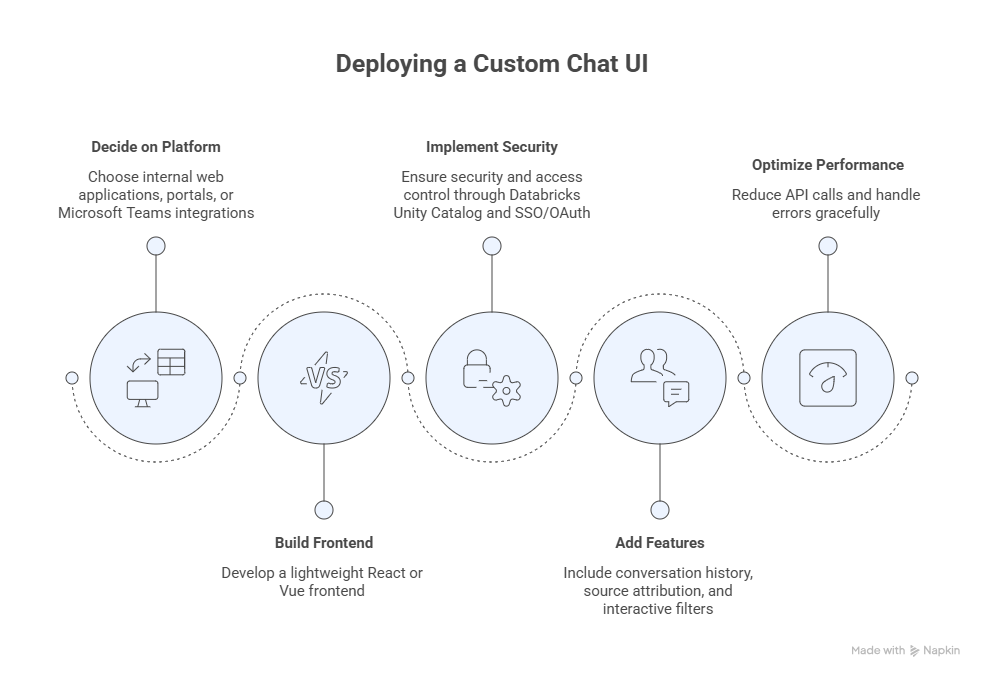
Fig 5 Design and Deployment Considerations for a Custom Chat UI
COMMON PITFALLS AND HOW TO AVOID THEM
Even with a robust platform like Databricks, deploying a generative AI chatbot comes with several common challenges. Understanding these pitfalls upfront helps ensure a smooth implementation and long-term reliability.
Incomplete or Poorly Structured Knowledge Bases
The chatbot will provide irrelevant or inaccurate answers if the source papers are inconsistent, out-of-date, or incorrectly chunked. Investing in document preprocessing, cleaning, and segmentation as well as adding information for filtering is the solution..
Over-Reliance on Model Speculation
In the absence of well-crafted cues, the chatbot might produce logical but unsubstantiated responses. Solution: set up prompts to tell the model to cite sources and design a RAG procedure where responses are based on retrieved context..
Inefficient Vector Search or Retrieval
If retrieval parameters are not adjusted, large vector indices may impede query performance. Optimize vector table indexes, employ approximate nearest neighbor (ANN) search where necessary, and restrict the quantity of retrieved chunks to preserve latency and relevancy.
Insufficient Monitoring and Observability
Troubleshooting can be difficult without measurements for latency, token use, and query trends. The solution is to monitor model performance, log retrieval quality, and use Databricks observability tools to identify and resolve problems early.
By addressing these issues directly, organizations can maintain high response accuracy, reduce costs, and offer users a dependable experience in both internal and external applications.
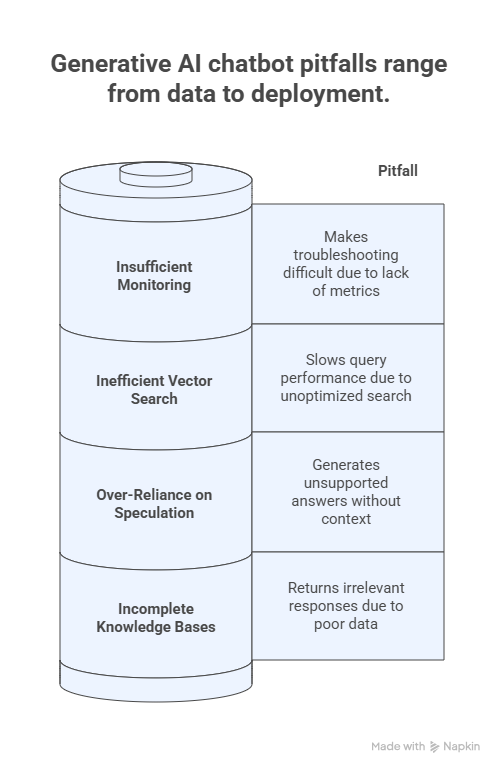
Fig 6 Common Pitfalls in Building and Deploying Generative AI Chatbots
CONCLUSION
Using Databricks to build a generative AI chatbot combines data engineering, governance, and retrieval operations with the power of large language models. Organizations can create chatbots that give relevant responses based on reliable data by using RAG, vector search, and model serving.
Successful deployment requires careful data preparation, organized embeddings, effective prompts, and scalable model serving endpoints. Accessibility, security, and clarity should be top priorities in the user interface. Teams must regularly monitor performance and costs.
In the future, businesses can improve their chatbots by adding multi-modal features, fine-tuning, and interaction with larger AI-driven workflows. With a strong foundation in Databricks, teams can turn their AI assistants into reliable business solutions that improve productivity, decision-making, and knowledge access across the organization.
REFERENCES
[1] Use agent bricks: Knowledge assistant to create a high-quality chatbot over your documents. Databricks on AWS. https://docs.databricks.com/aws/en/generative-ai/agent-bricks/knowledge-assistant
[2] Agent Bricks, “Implementing a RAG chatbot using Databricks and Pinecone,” Databricks Blog, 2025. [Online]. Available: https://docs.databricks.com/aws/en/generative-ai/agent-bricks/knowledge-assistant
[3] Databricks, “Production‑Quality RAG Applications with Databricks,” Databricks Blog, 2025. [Online]. Available: https://docs.databricks.com/en/generative-ai/generative-ai.html
[4] Databricks, “Retrieval Augmented Generation (RAG),” Databricks Glossary/Documentation, 2025. [Online]. Available: https://docs.databricks.com/en/ai-cookbook/rag-overview.html
[5] Databricks, “Use Agent Bricks: Knowledge Assistant to create a high‑quality chatbot over your documents,” Databricks Documentation (AWS), Jan. 2026. [Online]. Available: https://docs.databricks.com/aws/en/generative‑ai/agent‑bricks/knowledge‑assistant
[6] Databricks, “RAG (Retrieval‑Augmented Generation) on Databricks,” Databricks AI Cookbook, 2025. [Online]. Available: https://docs.databricks.com/en/ai‑cookbook/rag‑overview.html
About the Author
Karthik Gudipally
Karthik Gudipally is an early-career Full-Stack .NET Developer with a strong foundation in application development and a growing focus on building reliable, scalable systems. With hands-on experience in Angular, JavaScript, and Power BI, he enjoys turning business requirements into clean, maintainable solutions. He is particularly interested in improving application performance, data visibility, and overall system reliability through thoughtful design and best practices. Karthik values collaboration, enjoys learning modern development tools, and continuously looks for ways to write better code and deliver meaningful outcomes in real-world projects.
View Karthik Gudipally's profile