
10 Shocking Ways Generative AI Is Rewriting the Rules of Data Science on Databricks
Look, I’m just going to say it: half the data scientists I know they are still grinding through the same notebook hell they were stuck in two years ago, while GenAI is quietly eating their lunch.
And the worst part? They know it’s happening. They just don’t know what to do about it.
WHY YOU SHOULD ACTUALLY CARE (BEYOND THE HYPE)
Here’s what nobody’s talking about: Databricks wasn’t built for the LLM era. It was built for structured pipelines, batch jobs, and carefully engineered feature stores. But GenAI doesn’t care about your feature engineering discipline. It wants context windows, not feature tables. It wants to generate code, not just run it.
The gap between “data scientists who use Databricks” and “data scientists who use GenAI to drive Databricks” is growing fast. And if you’re still writing every SQL query by hand, still debugging Spark errors the old way, still documenting models like it’s 2019, you’re on the wrong side of that gap.
I’ve watched teams cut their iteration time in half by treating LLMs as a layer on top of their existing lakehouse stack. Not replacing it. Accelerating it.
HERE’S MY THESIS
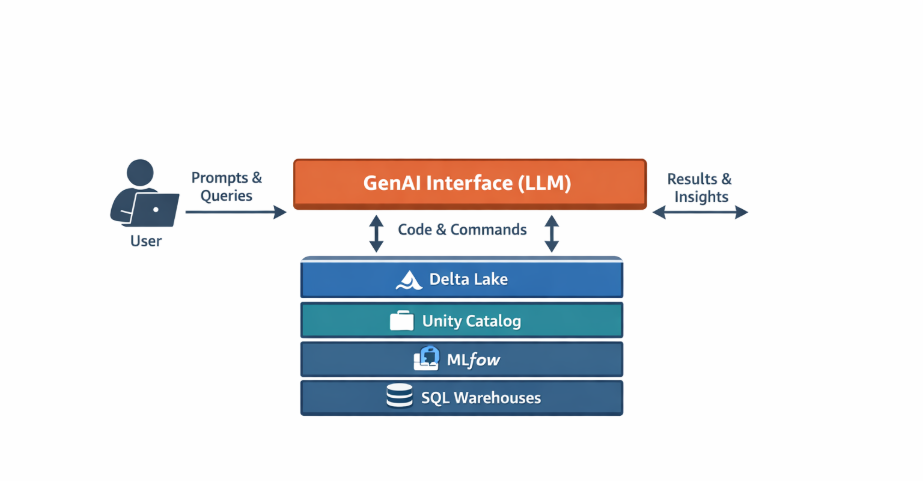
GenAI isn’t replacing your Databricks workflows. It’s becoming the interface to them [1]. The control plane. The thing that sits between you and the lakehouse and makes everything faster.
I call this the GenAI-Assisted Lakehouse: using LLMs to write, debug, and orchestrate your Delta Lake operations, your Unity Catalog governance, your MLflow experiments amd all the stuff you’re already doing, just 3x faster.
Let’s get into the 10 ways this is already happening.
Delta Live Tables Pipelines Write Themselves Now (And Yeah, They’re Pretty Good)
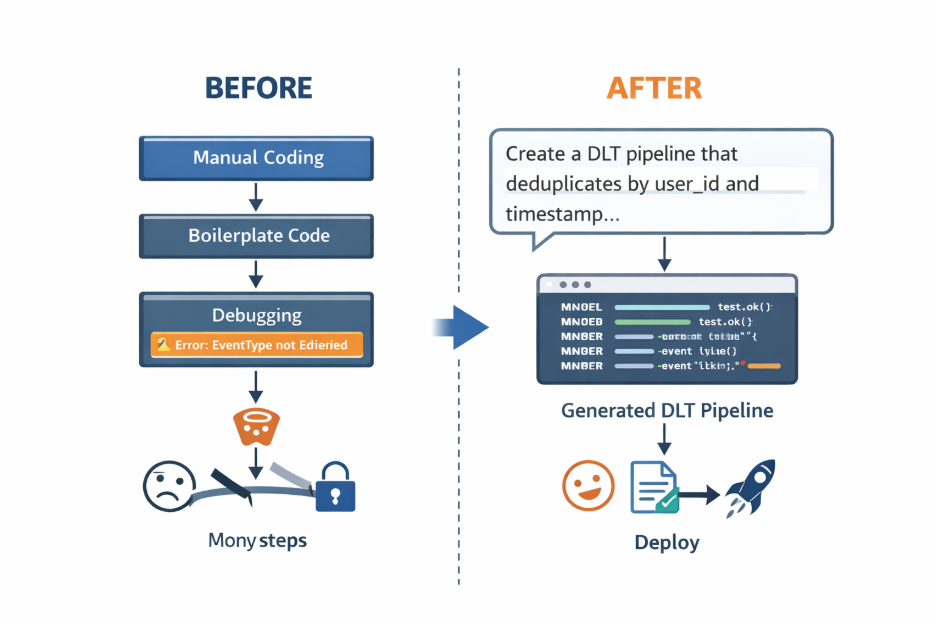
I spent three hours last Tuesday writing a DLT pipeline. Stream from the auto loader, dedupe on a composite key, apply some expectations, and write to silver. Standard stuff.
Then I tried something: I described what I wanted in plain English to LLM, got back a complete DLT notebook with all the decorators and expectations, tweaked it for five minutes, and deployed it.
The kicker? It included an error handling I’d forgotten about.
Here’s the thing: LLMs are really good at boilerplate. And DLT pipelines are 70% boilerplate [3]. So now when I need a new pipeline, I start with:
“Create a Delta Live Tables pipeline that reads JSON from /mnt/events, deduplicates by user_id and timestamp, drops rows where event_type is null, and writes to catalog.schema.silver_events as a streaming table.”
I got back the working code. I review it (obviously), test it in dev, and ship it.
What you lose: Deep understanding of edge cases if you’re not careful. The LLM doesn’t know your data quirks. You still need to think.
But the time savings? Massive.
Feature Engineering Is Becoming a Conversation
Remember when building features meant writing gnarly window functions, self-joins, and then wrestling with the Feature Store API to actually register the damn things?
Now I just describe what I want: “7-day rolling average of purchase_amount per user from the transactions table, register it in the Feature Store as user_purchase_features.”
The LLM gives me the SQL with the window logic and the Python code to register it with FeatureEngineeringClient. Copy, paste, run, done.
I’m not saying this replaces domain expertise. You still need to know which features to build. But the grunt work of writing and registering them? That’s become a 30-second task instead of a 30-minute one [3,4].
Concrete move: Build a “feature template library” in your team’s Databricks Repo. When someone creates a useful feature pattern, they save the prompt that generates it. Over time, you’ve got a library of reusable patterns that anyone can invoke.
Three months in, my team has 15 templates. New people onboard faster. We ship features faster. It’s not magic, it’s just less typing.
Your Analysts Are Writing SQL You Didn’t Know They Could Write
This one is both amazing and terrifying.
Last week, an analyst on my team, someone who usually asks me to write joins , dropped a query in Slack that did a three-table join with window functions and a CTEs. Clean code. Proper aliasing. Commented.
“Did you write this?”
“Nope. Asked Claude.”
Here’s the reality: the barrier between “I need a data scientist” and “I can figure this out myself” is collapsing [2] . LLMs generate SQL so well that analysts are bypassing the backlog entirely.
Which is great for velocity .But also means you need to care about what they’re running, because unoptimized queries can blow up your warehouse costs real fast [2,7].
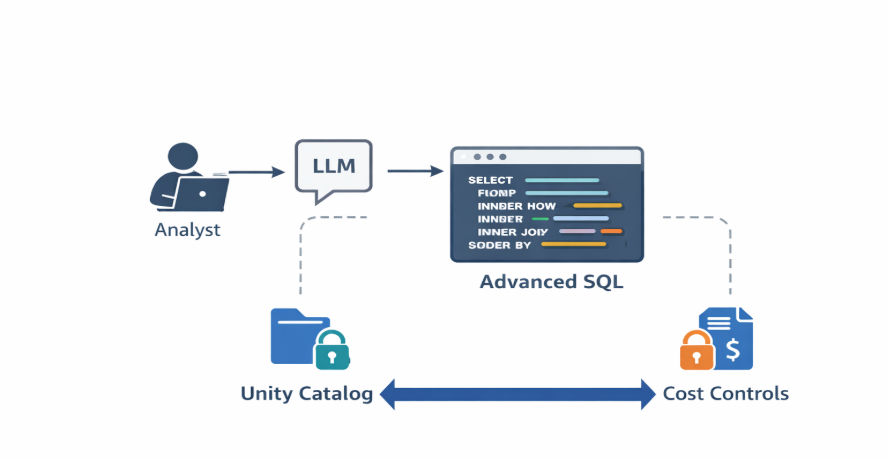
What I’m doing about it: We created a prompt template that includes our Unity Catalog table names and forces the LLM to add comments and explain the query logic. It’s not perfect, but it helps.
More importantly, I set up query cost alerts on our SQL warehouses. Because if someone accidentally scans 10TB without partition filters, I want to know immediately.
I Haven’t Written a Unit Test By Hand in Three Months
Confession: I used to skip unit tests on data pipelines because they were tedious. Mock DataFrames, write assertions, handle edge cases ,it felt like more work than the pipeline itself.
Then I started pasting my transformation functions into an LLM with: “Write pytest tests for this, including null values, empty DataFrames, and schema mismatches.”
Thirty seconds later, I have five test cases ready to go.
Do I review them? Yes. Do I add domain-specific cases to the LLM missed? Also, yes. But the scaffolding is done. I just fill in the gaps [3].
The template that works for me:
“You’re writing pytest tests for PySpark transformations. Here’s my function: [paste]. Generate tests for: happy path, nulls, empty input, schema validation, and this edge case: [describe it]. Use PySpark assertions.”
I run these in CI/CD now. It’s changed how I ship code.
Model Documentation Actually Happens Now
Nobody documents models. We all know we should. We all feel guilty. And then we ship the model anyway because the docs take an hour, and we’ve got three other experiments to run.
GenAI fixed this for me by accident.
After training a churn model, I pasted my notebook into Claude and asked: “Generate a model card with objective, features, metrics, training data, and limitations.”
Got back a clean, structured model card in 20 seconds. Logged it as an MLflow artifact. Done.
Now I do this for every model. It’s a habit because it’s easy. And when someone asks “why did we use these features?” three months later, I have an actual answer.
Trade-off: The LLM doesn’t know context outside your notebook. If there are upstream data issues or business constraints, you need to add them manually.
But even a 70% complete model card is infinitely better than nothing [1,2].
Debugging Spark Errors Is 10x Faster (Because LLMs Read Stack Traces Better Than I Do)
Spark errors are cryptic nightmares. AnalysisException: cannot resolve column X given input columns Y, Z. Cool, thanks Spark, super helpful.
I used to Google these, read three StackOverflow threads, and guess. Now I paste the error and my query into an LLM.
Last week: AnalysisException: cannot resolve 'user_id'
Pasted it with my join logic. LLM came back: “The left table uses ‘customer_id’, not ‘user_id’. Check your schema with printSchema().”
Fixed in 30 seconds.
Is this revolutionary? No. Does it save me 20 minutes of trial-and-error every time? Absolutely [3].
I keep a browser bookmark called “Spark Debug Assistant” with a pre-filled prompt. When something breaks, I paste the error + code, get a diagnosis, fix, and move on.
Real Story: A Data Scientist Cut EDA Time by 60%
Sarah’s a DS at a fintech startup. She used to spend 2–3 hours on exploratory data analysis for every new dataset ,running .describe(), checking nulls, plotting distributions, looking for correlations.
She built a prompt: “Generate a PySpark EDA script for this Delta table. Include null analysis, summary stats by category, numeric distributions, correlation heatmap, and outlier detection. Here’s the schema: [paste].”
Now her EDA takes 45 minutes. She reviews the generated code, tweaks it, and runs it.
The time savings didn’t go to coffee breaks. It went to feature engineering and model iteration [4]. She’s shipping faster because the boring stuff is automated.
The lesson: Identify your repetitive tasks. The ones you do every single week. Build prompts for them. Bank the time savings.
Data Quality Checks Are Now Plain English
I used to write Delta Live Tables expectations by hand: @dlt.expect_or_drop("valid_amount", "amount > 0"). Then I’d think through edge cases, add more expectations, and test them.
Now I describe the rules: “Transaction amount must be positive, user_id can’t be null, transaction_date must be within the last 2 years, transaction_type must be purchase/refund/chargeback.”
The LLM generates all four expectations with the correct syntax. I review, add to my pipeline, and am done.
What I learned: Auto-generated checks can be too strict or too loose. You need domain knowledge to evaluate them. But getting the first draft in 10 seconds instead of 10 minutes? That’s the win.
We Built “Ask Your Data” Using RAG on Unity Catalog Metadata
This one’s my favorite because it’s genuinely useful every day.
People used to Slack me: “Which table has customer emails?” or “Who has access to the transactions table?”
Now they ask a RAG system we built on Unity Catalog metadata. It retrieves table schemas, column descriptions, tags, and access grants, then answers in plain English.
“What tables contain PII and who can access them?”
“The tables prod.customer.profiles and prod. transactions.Orders contain PII. Access granted to data-science and analytics groups.”
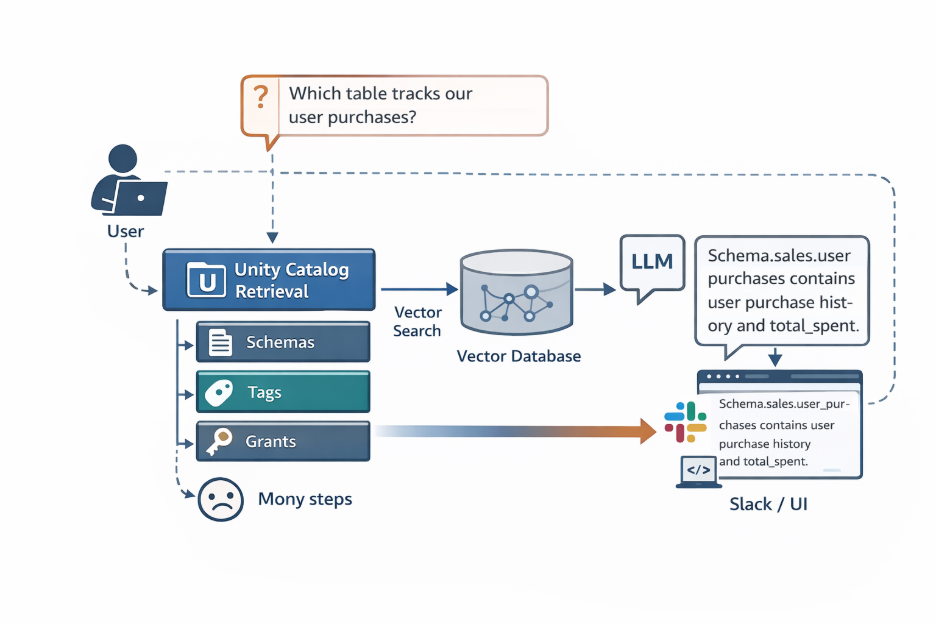
How we built it:
- Export Unity Catalog metadata (schemas, comments, tags, grants) to a Delta table
- Embed it using OpenAI’s embedding model
- Store embeddings in Databricks Vector Search
- Build a simple RAG app: user query → retrieve metadata → LLM answers
- Expose as a Slack bot
Took two weeks to build. Now saves everyone 5–10 minutes per day when they need to find something.
The catch: Your Unity Catalog metadata has to be well-maintained. If table descriptions are missing or tags are wrong, the RAG system returns garbage. So now we enforce metadata standards in our PR reviews.
Another Real Story: A Team Cut Notebook Clutter by 40% Using AI Refactoring
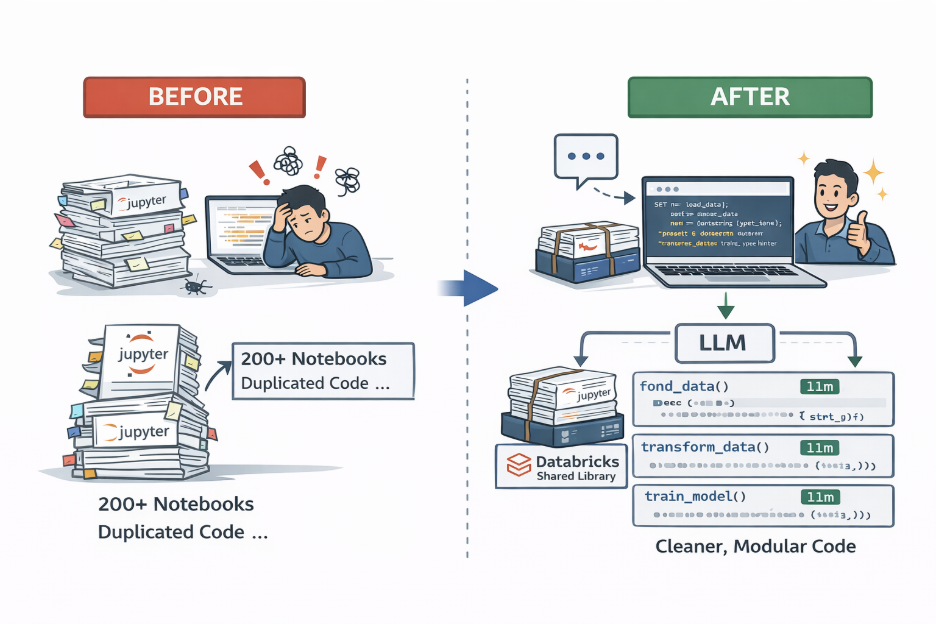
A platform team had 200+ notebooks. Duplicated logic everywhere. No modularity. Code reviews took forever.
They started using an LLM to refactor notebooks: “Refactor this into modular functions with docstrings. Separate data loading, transformations, and training. Use type hints.”
The LLM generated cleaner, testable code. They packaged it into a shared library in Databricks Repos.
Notebook length dropped 40% [3] . New team members onboarded faster because the code was actually readable.
What they learned: The LLM is great at structural refactoring. But you still need human judgment on what should be modular. Don’t blindly accept its suggestions.
WHAT A WORKFLOW ACTUALLY LOOKS LIKE NOW
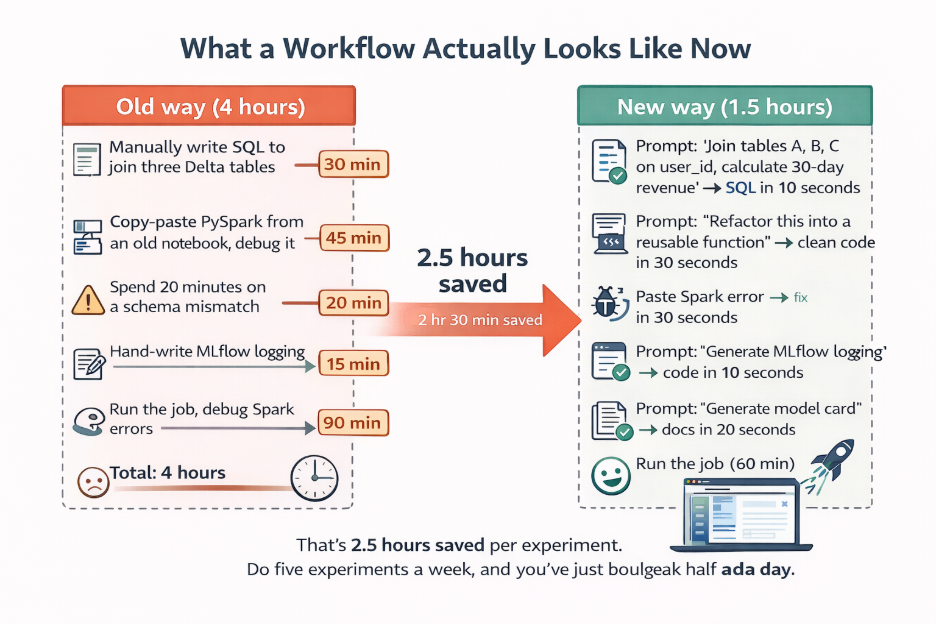
Old way (4 hours):
- Manually write SQL to join three Delta tables (30 min)
- Copy-paste PySpark from an old notebook, debug it (45 min)
- Spend 20 minutes on a schema mismatch
- Hand-write MLflow logging (15 min)
- Forgot to document the experiment
- Run the job, debug Spark errors (90 min)
New way (1.5 hours):
- Prompt: “Join tables A, B, C on user_id, calculate 30-day revenue” → SQL in 10 seconds
- Prompt: “Refactor this into a reusable function” → clean code in 30 seconds
- Paste Spark error → fix in 30 seconds
- Prompt: “Generate MLflow logging” → code in 10 seconds
- Prompt: “Generate model card” → docs in 20 seconds
- Run the job (60 min)
That’s 2.5 hours saved per experiment [4] . Do five experiments a week, and you’ve just bought back half a day.
WHERE THIS ALL FALLS APART (AND HOW TO STOP IT)
GenAI isn’t perfect. It hallucinates. It ignores governance. It doesn’t understand your data lineage. Here’s where I’ve seen it fail:
Hallucinated schemas: The LLM invents columns that don’t exist. Always pull the actual schema from Unity Catalog and include it in your prompt.
Governance blindness: It suggests queries that violate row-level security. Before running generated SQL, check grants via Unity Catalog APIs.
Lineage gaps: Generated code doesn’t log lineage. Add a post-processing step to log transformations to Unity Catalog.
Unoptimized queries: It writes queries that scan petabytes without partition filters. Set query cost limits on warehouses.
The fix: Human-in-the-loop [1, 2] . Always review generated code. Run it in dev first. Check for correctness, performance, and security.
We built a “safe prompt library” in our Databricks Repo. Every prompt includes schema validation and governance checks built in. It’s not foolproof, but it catches most issues.
FIVE MISTAKES I’VE MADE (SO YOU DON’T HAVE TO)
- Treating LLM code as production-ready: Always review. I deployed the generated code without testing it once. It worked, but it was wildly inefficient.
- Prompting without schema context: Include df.printSchema() or Unity Catalog metadata in every prompt. Otherwise, the LLM guesses.
- Letting people run LLM-generated SQL in production without guardrails: Set up cost alerts. Require approval for large scans.
- Not versioning prompt templates: Store them in Repos as markdown files. Treat them like code.
- Assuming the LLM is always right: It’s not. Validate generated code against actual data before trusting it.
WHAT YOU SHOULD DO IN THE NEXT 24 HOURS
Pick one thing you do every week that’s repetitive. Writing SQL queries? Debugging Spark errors? Feature engineering?
Build a prompt template for it. Test it on three real examples from last month. Refine it until it works.
Then save it in a Databricks Repo folder called genai-prompts and share it with your team.
The checklist:
Identify one repetitive weekly task
Draft a prompt with placeholders for your specific use case
Test on three real examples
Refine based on what the LLM got wrong
Save to Repos under genai-prompts/
Share with your team on Slack
Track time saved over the next week
If you save 30 minutes in week one, make two more templates. Calculate your monthly ROI. You’ll be surprised.
The lakehouse isn’t going anywhere. But the way you interact with it? That’s changing fast.
REFERENCES
[1] Bender, E. M., Gebru, T., McMillan-Major, A., & Mitchell, S. (2021). On the dangers of stochastic parrots: Can language models be too big? Proceedings of the 2021 ACM Conference on Fairness, Accountability, and Transparency (FAccT). https://doi.org/10.1145/3442188.3445922
[2] Bin-Nashwan, S. A., Sadallah, M., & Bouteraa, M. (2023). Use of ChatGPT in academia: Academic integrity hangs in the balance. Technology in Society, 75, 102370. https://doi.org/10.1016/j.techsoc.2023.102370
[3] Gillioz, A., Casas, J., Mugellini, E., & Khaled, O. A. (2020). Overview of transformer-based models for NLP tasks. Proceedings of the 2019 Federated Conference on Computer Science and Information Systems (FedCSIS). https://doi.org/10.15439/2020F20
[4] Gupta, P., Ding, B., Guan, C., & Ding, D. (2024). Generative AI: A systematic review using topic modelling techniques. Decision Analytics Journal, 10, 100066. https://doi.org/10.1016/j.dajour.2024.100066
[5] Width.ai. (n.d.). How we build the highest-confidence GPT-3 chatbots. https://www.width.ai/post/gpt-3-chatbots
[6] Islam, S. M. R., Elmekki, H., Elsebai, A., Bentahar, J., Drawel, N., Rjoub, G., & Pedrycz, W. (2023). A comprehensive survey on applications of transformers for deep learning tasks. arXiv preprint arXiv:2306.07303. https://doi.org/10.48550/arXiv.2306.07303
[7] Javidan, A., Feridooni, T., Gordon, L., & Crawford, S. A. (2023). Evaluating the progression of artificial intelligence and large language models in medicine: A comparative analysis of ChatGPT-3.5 and ChatGPT-4. Journal of Vascular Surgery, 78(4), 100049. https://doi.org/10.1016/j.jvsvi.2023.100049
About the Author
Gayatri Ramani Bommisetty
Gayatri Ramani Bommisetty is a data engineer who builds production data pipelines and analytics platforms with a strong business lens. Works with Python and SQL to ingest data from APIs and transactional systems, orchestrates workflows using Airflow, and designs lakehouse architectures that turn raw data into reliable, analytics-ready datasets. With a background in analytics and finance, she focuses on pipeline reliability, data quality, and data models that actually support real business decisions.
View Gayatri Ramani Bommisetty's profile